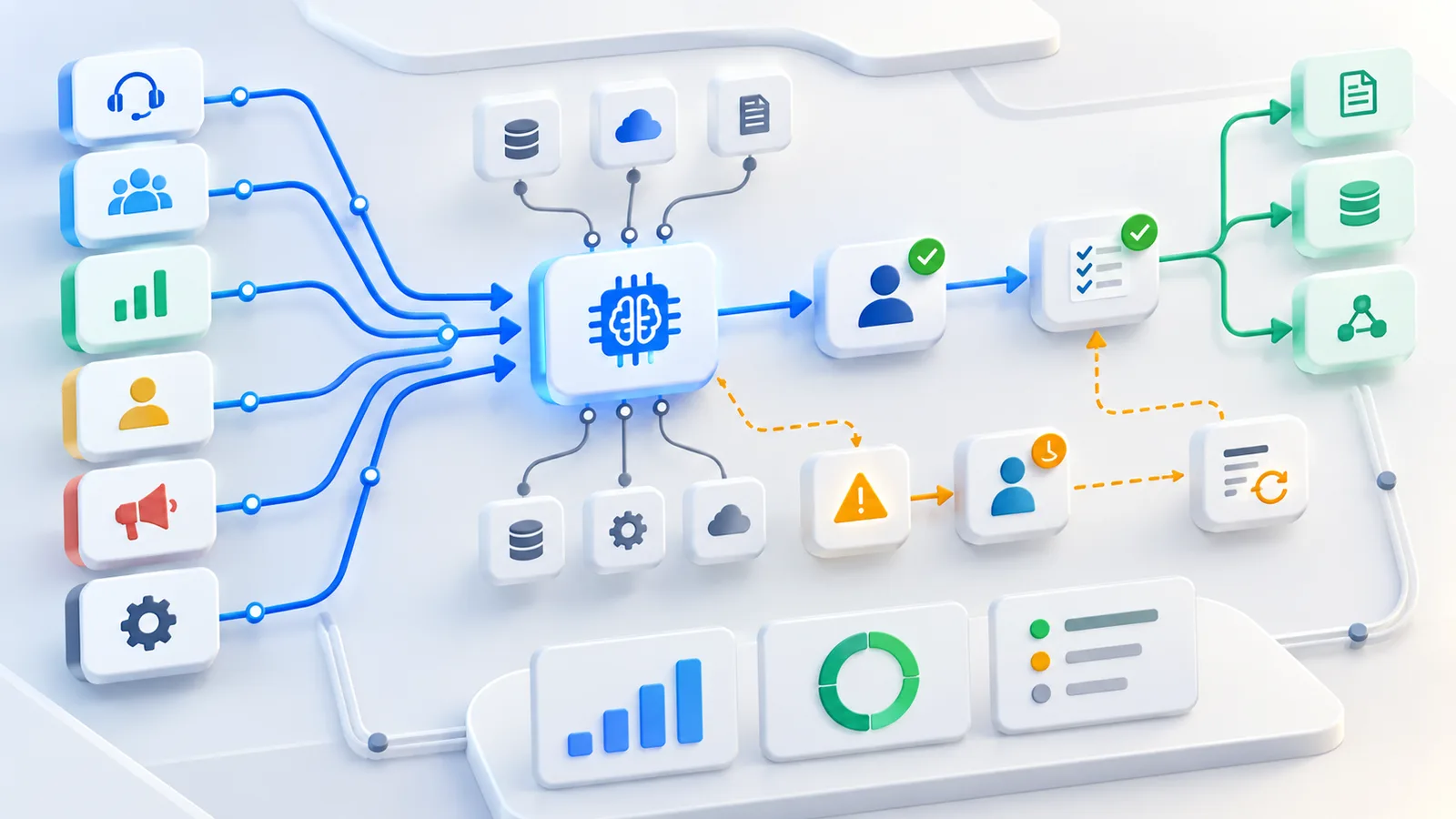
AI workflow automation works best when it starts with the work itself, not with a tool demo. Before choosing an AI assistant, agent or automation platform, a business needs to understand the trigger, inputs, systems, handoffs, risks and review points inside the workflow.
That mapping step is what turns AI from a loose experiment into a usable business process. A narrow workflow with clear ownership is easier to test, safer to improve and more likely to create measurable value than a broad automation project with unclear boundaries.
What Is AI Workflow Automation?
AI workflow automation uses AI models, agents or assistants inside a business process to classify information, summarize data, draft content, route work, trigger actions or support decisions. It is different from asking an AI tool one question at a time because the AI becomes part of a repeatable sequence of work.
A simple workflow might start when a customer enquiry arrives, use AI to summarize the request, check the account context, suggest a response and route the case to the right person. A more advanced workflow might connect a CRM, support inbox, document library and reporting dashboard.
The goal is not to remove people from every step. The goal is to reduce avoidable manual work while keeping accountability visible. The more important the decision, the clearer the review point should be.
Why Process Mapping Comes Before AI Tools
Process mapping shows what actually happens before a business chooses the AI tool. It records the trigger, input data, systems involved, decision points, handoffs, exceptions, owner and final outcome.
Without that map, a team may automate the wrong step. It may connect the wrong data, skip a needed approval or create output that no one is responsible for reviewing.
A useful workflow map answers these questions:
- What starts the workflow?
- What information enters the process?
- Which systems does the team use?
- What decision or output is needed?
- Who checks the result?
- What happens when the AI is uncertain?
- What should be logged?
- How will success be measured?
For example, "automate customer support" is too broad. "Classify new support tickets by topic, urgency and account type before a support specialist replies" is a better first workflow. It has a trigger, input, output, review point and owner.
AI Agents vs Traditional Automation
Traditional automation follows fixed rules. If a form field says "billing," the ticket goes to the billing queue. If an invoice is over a set amount, it requires approval. These workflows are predictable and often do not need AI.
AI agents and AI assistants can handle more variable information. They can summarize a long email, identify intent, compare a request with policy documents, draft a response or use tools within defined limits.
That flexibility creates new responsibilities. If the AI can read customer records, update a CRM, draft external messages or trigger actions, the workflow needs clear permissions, logs and review rules.
Use fixed automation when the rule is stable and the input is structured. Use AI when the work involves language, judgment support, summarization or variable documents. Use human review when the output affects customers, money, HR, compliance or business commitments.
How To Choose Your First AI Automation Workflow
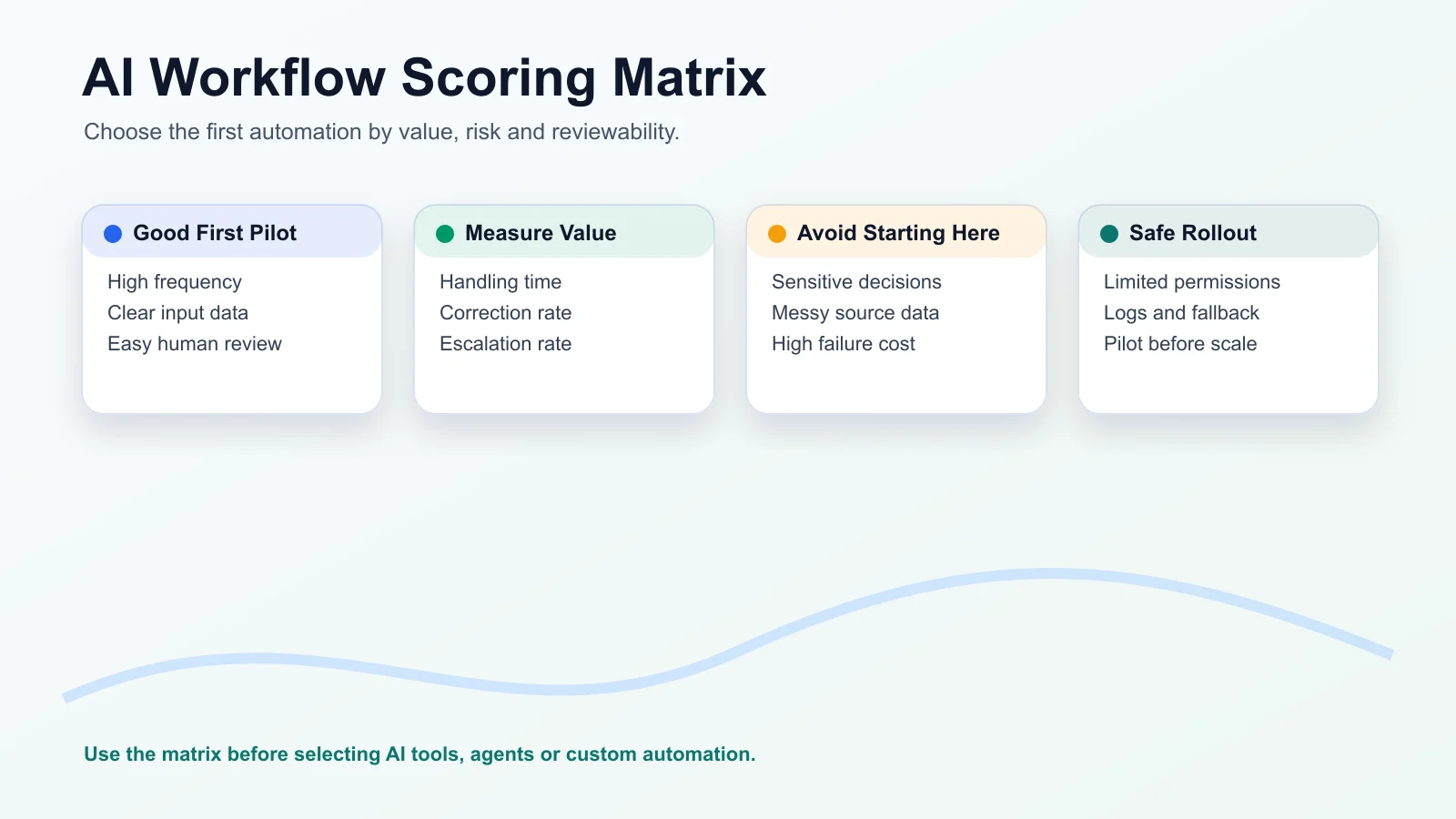
Choose a workflow that happens often, has clear inputs, creates measurable value and has manageable risk. A narrow and reversible workflow is usually a better first project than a large automation with unclear ownership.
Score each candidate workflow from 1 to 5 across five areas:
- Frequency: how often does this happen?
- Value: how much time, quality or response speed could improve?
- Data quality: is the needed information available and reliable?
- Risk: what happens if the output is wrong?
- Reviewability: can a person quickly check the result?
A good first workflow scores high on frequency, value and reviewability, and moderate or low on risk. If the data is messy or the failure cost is high, start somewhere else.
Good first workflows often include:
- Drafting support replies for human review.
- Routing leads by service, location or urgency.
- Summarizing meetings into tasks.
- Preparing invoice exceptions for review.
- Turning one approved marketing asset into channel-specific drafts.
- Answering internal policy questions with source links.
Define success before building. Useful measures include handling time, review time, correction rate, escalation rate, customer response time and the number of cases completed without rework.
8 Examples Of Artificial Intelligence In The Workplace
Practical AI automation examples work best when each one has a clear input, AI action and human review point.
Customer Support Triage
Input: customer email, chat transcript or form submission.
AI action: classify topic, urgency, sentiment and account context.
Human review: support specialist approves the response or escalation.
This helps teams respond faster without letting AI make unsupported promises.
Sales Lead Routing
Input: enquiry form, company size, location, service interest and notes.
AI action: summarize the lead, identify service fit and suggest routing.
Human review: sales owner confirms qualification and next action.
This can help small teams avoid missed leads and inconsistent handoffs.
Meeting Summaries And Tasks
Input: meeting transcript or notes.
AI action: summarize decisions, extract tasks and identify owners.
Human review: meeting owner confirms the summary before sharing.
This is often a low-risk first workflow because the people in the meeting can verify the output.
Finance Invoice Review
Input: invoice, purchase order, vendor record and approval rules.
AI action: flag missing information, summarize exceptions and prepare a review queue.
Human review: finance owner approves, rejects or investigates.
AI should support review here, not silently approve payments.
HR Document Drafting
Input: policy, role description, employee request or template.
AI action: draft a response or document summary.
Human review: HR owner reviews for accuracy, tone and compliance.
Do not use AI to make sensitive employment decisions without qualified human oversight.
Marketing Content Repurposing
Input: approved blog post, product page, webinar or case note.
AI action: create draft social posts, email snippets or campaign variations.
Human review: marketer checks claims, tone, audience fit and brand voice.
This is useful when the source content is already approved.
Operations Alerts
Input: inventory updates, delivery status, support backlog or location reports.
AI action: summarize exceptions and flag unusual patterns.
Human review: operations manager decides what action to take.
This can be useful for multi-location businesses that need consistent visibility across branches.
Internal Knowledge Assistant
Input: approved policies, SOPs, product documents and team notes.
AI action: answer employee questions and show source references where possible.
Human review: owner reviews gaps, outdated answers and repeated questions.
This works best when the source documents are current and access permissions are clear.
High-Value Repetitive Tasks In Finance, HR, Marketing And Operations
The best automation candidates are repeated tasks with clear inputs and reviewable outputs. They do not have to be glamorous. They need to be frequent enough to measure and important enough to matter.
In finance, useful candidates include invoice exception summaries, payment reminder drafts, expense categorization support and monthly variance explanations for review.
In HR, useful candidates include policy lookup, onboarding checklists, role description drafts, training reminders and employee question routing. Keep sensitive decisions under human control.
In marketing, useful candidates include content repurposing, campaign brief drafts, lead source summaries, customer question clustering and performance report summaries.
In operations, useful candidates include order exception alerts, location-level reporting, vendor follow-ups, scheduling summaries and internal request routing.
For multi-location businesses, AI automation can help standardize reporting and escalation. A workflow might collect updates from several locations, summarize exceptions, flag missing data and route the right issue to the right manager.
AI Automation Trends Small Businesses Should Watch In 2026
The useful 2026 trend is not more disconnected AI tools. It is AI connected to real workflows, business systems and approval paths.
Small businesses should watch four practical trends.
First, AI assistants are moving inside tools teams already use, such as inboxes, CRMs, documents and support systems. This reduces the need to copy and paste work between apps.
Second, agentic workflows are becoming more common. These workflows can plan steps, use tools and handle multi-step tasks within defined boundaries.
Third, voice and chat automation are becoming easier to connect to support, sales and internal knowledge workflows. This can help teams respond faster, but it also needs clear escalation.
Fourth, monitoring matters more. Teams need to track corrections, escalations, user feedback and failure patterns, not just task volume.
The best small-business strategy is to avoid chasing every trend. Pick one workflow, limit permissions, keep human review and measure whether the work actually improves.
AI Business Solutions: Build, Buy Or Connect?
A business can use a standard AI tool, connect existing apps with automation or build a custom AI workflow. The right choice depends on data sensitivity, integrations, budget, speed and control.
Use a standard tool when the task is common, low-risk and does not need deep integration. Examples include meeting summaries, draft writing or basic document search.
Connect existing apps when the workflow spans systems. For example, a lead might come from a website form, enter a CRM, trigger a summary, create a task and notify the right person.
Build a custom workflow when the business needs specific permissions, custom review screens, private data handling, multi-system logic or a user experience that standard tools cannot provide.
Before choosing, ask:
- What data will the AI access?
- Which systems must it connect to?
- What action can it take?
- Who reviews the output?
- What should happen when confidence is low?
- What logs does the business need?
- Can the workflow start smaller?
A good AI business solution fits the process. It should not force the business to redesign important work around a tool's limitations.
Governance, Human Review And Safe Rollout
AI workflow automation needs clear permissions, review rules, logs, fallback paths and owners. The goal is to make the workflow useful without hiding responsibility.
Set permissions around the task. A support assistant may read approved help articles and draft replies, but it may not issue refunds or change account status without approval.
Keep human review where risk is meaningful. Customer commitments, financial actions, HR decisions, legal language and public claims need careful oversight.
Log decisions and corrections. If reviewers often fix the same type of output, the workflow needs better instructions, better source data or narrower scope.
Create a fallback path. Users should know what to do when AI is uncertain, unavailable or clearly wrong.
Start with a pilot. Use limited users, limited actions and a clear review period. Expand only when correction patterns, user feedback and business value support the next step.
For a broader control framework, read WebNextify's guide to AI governance.
A Simple AI Workflow Automation Template
Use this template before choosing a tool or building a workflow.
Workflow name: [Name the workflow]
Business goal: [What should improve]
Trigger: [What starts the workflow]
Input data: [Documents, forms, messages or records used]
Systems involved: [CRM, inbox, website, database, documents or other tools]
AI action: [Classify, summarize, draft, route, compare, extract or flag]
Human review point: [Who checks the output and when]
Exception path: [What happens when data is missing or risk is high]
Owner: [Business owner and technical owner]
Success metric: [Time saved, correction rate, response time, rework, escalation or quality measure]
Review date: [When the pilot will be evaluated]
If you cannot fill in these fields, the workflow is not ready for automation yet.
Common Questions About AI Workflow Automation
What Should A Small Business Automate First?
Start with a repeated workflow that has clear inputs and a human review point. Support triage, lead routing, meeting summaries and internal knowledge lookup are often better first projects than sensitive finance or HR decisions.
Are AI Agents Safe For Business Workflows?
They can be useful when permissions, boundaries and review rules are clear. They become risky when they can access sensitive data or take external actions without oversight.
Can AI Automation Replace A Team Member?
In most small business workflows, the better goal is support, not replacement. AI can reduce drafting, sorting and lookup work, while people handle judgment, relationships and accountability.
How Do You Measure AI Automation Success?
Measure the old workflow first. Then compare handling time, review time, correction rate, escalation rate, rework and customer or team feedback after the pilot.
Do We Need Custom AI Automation?
Not always. Start with standard tools when the task is common and low-risk. Consider custom automation when you need private data handling, integrations, approval screens or a workflow that standard tools cannot support.
How WebNextify Can Help
WebNextify helps businesses map workflows, design AI assistants, connect business systems and build automation with review points, reporting and safe handoff. The work can include process discovery, CRM or support integrations, custom software workflows and practical rollout support.
If your team knows it wants AI automation but is unsure where to start, the first step is not a tool list. It is a clear map of the work, the people involved and the result you want to improve. You can talk to WebNextify when you are ready to turn that map into a practical build plan.
Conclusion
AI workflow automation works best when a business maps the real process first, chooses a narrow workflow, defines human review and measures outcomes before scaling. Start with work that is frequent, reviewable and valuable, then let evidence guide how far the automation should go.