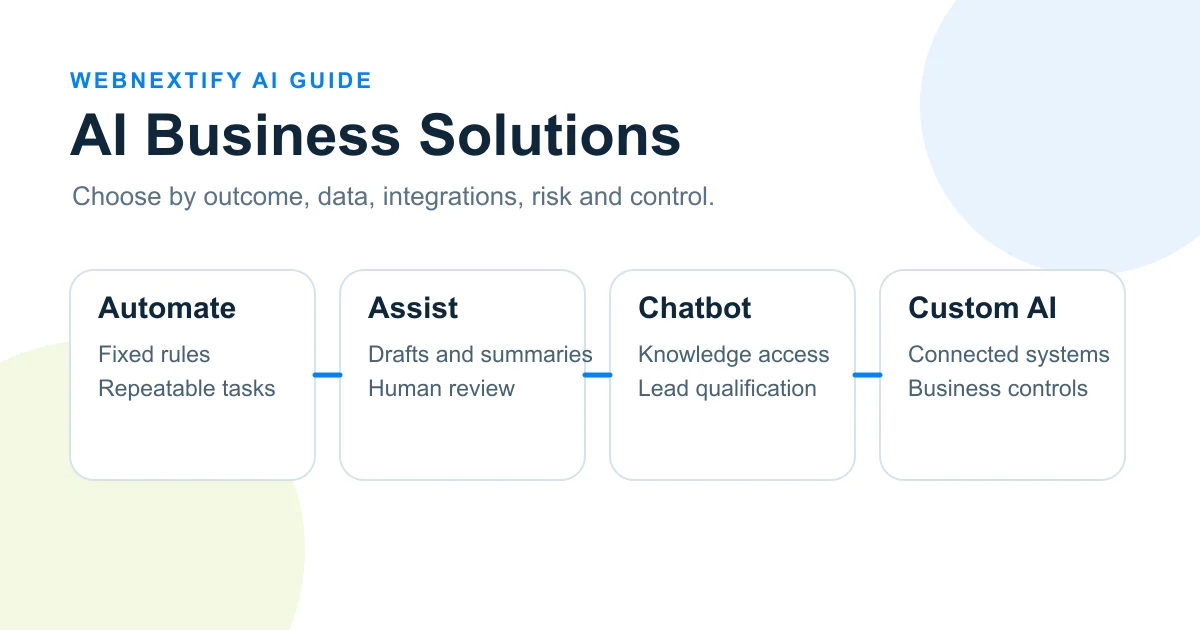
AI business solutions are software, automations, assistants or connected systems that use artificial intelligence to solve a defined business problem. A company might use AI to classify support requests, extract information from documents, answer questions from approved knowledge, summarize records, assist employees or coordinate work across several systems. The right approach depends less on how advanced the technology sounds and more on the work that needs to improve.
A practical selection process starts with the business outcome, then looks at the workflow, data, integrations, error risk and level of human control required. Fixed tasks may only need traditional automation. Variable language or documents may justify AI-assisted workflows. Repeated conversational needs may fit a chatbot. Unique multi-system requirements may justify custom AI business solutions. More autonomous agents should be considered only when their actions can be bounded, monitored and reviewed.
What Are AI Business Solutions?
An AI business solution applies one or more AI capabilities to a specific business task or workflow. The AI might classify information, generate a draft, retrieve relevant knowledge, identify patterns, recommend a next step or take a permitted action through another system. IBM describes AI in business as the use of technologies including machine learning, natural language processing, generative AI, predictive analytics and computer vision to automate work, optimize operations, improve decisions and create business value. See IBM's overview of AI in business.
Traditional automation is different. It works well when inputs and rules are predictable. For example, a form with a selected billing category can be routed to a billing queue without AI. AI becomes more useful when the input is a free-form customer message that must be interpreted before routing. In practice, many useful systems combine both approaches. AI interprets variable information, while ordinary software rules control what happens next.
AI business integration connects that capability to the systems where work already happens. That may include a CRM, support inbox, document library, database, website, reporting tool or internal application. Integration is often what turns a standalone AI feature into a usable business process because the system can work with approved data and pass results to the right people or tools.
Which Business Problems Are Good Candidates For AI?
Good AI candidates usually have repeated work, a clear business outcome and inputs that require some interpretation. IBM's current business AI guidance highlights customer service, workflow optimization, document processing, sales, marketing and operational decision support among common areas of use. See IBM's AI business use cases.
Customer Support And Knowledge Access
AI can help classify incoming requests, retrieve relevant policy or product information, draft responses and suggest escalation. A business does not have to automate the final customer response. A lower-risk design can keep a support specialist responsible for checking the answer before it is sent.
Documents And Operational Information
Invoices, forms, contracts, reports and internal records often contain variable text that does not fit a simple rule. AI can support extraction, classification, summarization and exception detection. The workflow still needs to define which source is authoritative, what happens when information is missing and who checks important exceptions.
Sales And Lead Management
AI can summarize enquiries, identify the service a prospect appears to need, prepare research or suggest routing. It should not automatically turn an uncertain model judgment into a permanent sales or customer record without appropriate validation.
A repeated task is not automatically an AI use case. If the workflow is unclear, the source data is unreliable or success cannot be measured, adding AI can make the process harder to understand rather than better.
When Should You Not Use AI?
Do not choose AI simply because a task can be automated. If a stable rule solves the problem reliably, ordinary automation may be easier to test, maintain and audit. AI may also be premature when process ownership is unclear, source information changes without control or a wrong output could create unacceptable consequences without an effective review step.
NIST's AI Risk Management Framework recommends examining an AI system's intended scope, expected benefits, costs of errors and human oversight in the context where it will operate. The framework is voluntary, and NIST notes that AI RMF 1.0 is currently being revised. See the NIST AI Risk Management Framework.
Use AI only when most of these conditions are true:
- The task happens often enough to make improvement meaningful.
- The desired outcome can be measured before and after a pilot.
- Variable text, documents, conversations, images or other inputs require interpretation.
- The required source data is accessible, current and appropriate for the task.
- A person or controlled fallback can handle uncertain or high-impact cases.
If most of these conditions are missing, improve the workflow or evaluate conventional automation first. A simpler system that reliably solves the business problem is often a better choice than adding unnecessary AI complexity.
Which Type Of AI Business Solution Should You Choose?
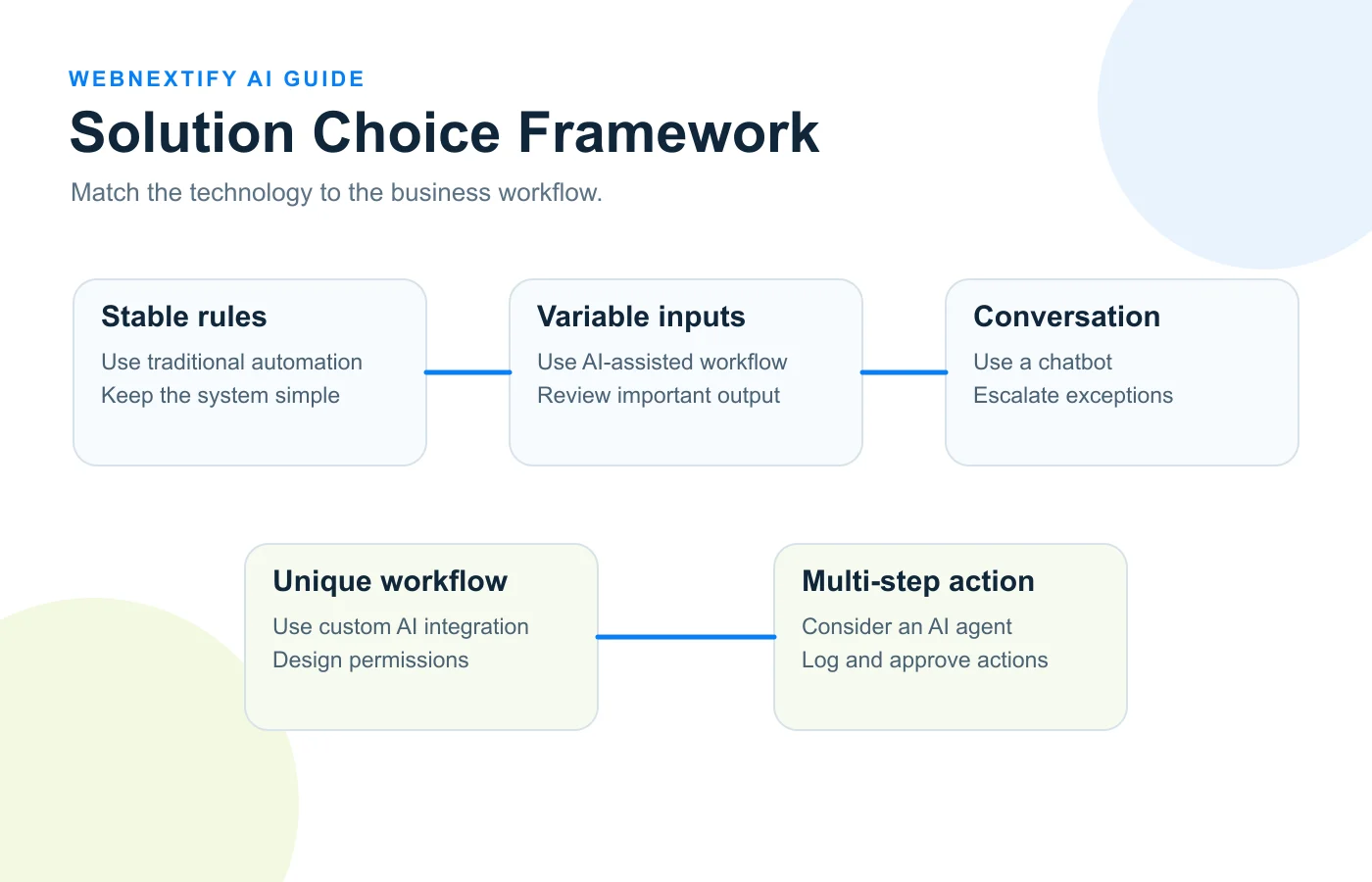
The choice should follow the task. Traditional automation suits fixed rules. AI-assisted workflows suit variable inputs inside a known process. Chatbots suit conversational support and knowledge access. Custom AI solutions make more sense when business-specific data, permissions, interfaces or integrations matter. AI agents can support controlled multi-step work when the organization is prepared to govern the actions they can take.
Compare common options this way:
- Traditional automation: best for fixed and predictable rules, often with low data needs and limited oversight.
- AI-assisted workflow: best for variable text, documents or inputs inside a known process, with review based on consequence.
- AI chatbot: best for support, qualification and knowledge access, with escalation for exceptions and sensitive actions.
- Custom AI solution: best for unique workflows, proprietary requirements, connected systems and business-specific controls.
- AI agent: best for controlled multi-step actions where permissions, logs and approvals match the risk.
When Does A Custom AI Business Solution Make Sense?
A custom AI business solution becomes more reasonable when the workflow is specific to the company and a ready-made product cannot support important requirements without major compromise. Those requirements may include several connected systems, proprietary data, role-based permissions, custom approval screens, business-specific rules, reporting or a user experience that must fit an existing application.
Custom does not necessarily mean training a new model from scratch. A solution can combine an existing model with approved company knowledge, APIs, authentication, workflow logic, audit records and a tailored interface. The custom work is often the system around the model: deciding what data it can access, what it can do, how results are checked and how the AI fits the rest of the business process.
An off-the-shelf product is often the better choice when the requirement is common, low-risk and already well supported by software the team uses. It can also be preferable when fast deployment and low maintenance matter more than deep control. Custom development should solve a real constraint, not serve as a status symbol.
How Should You Evaluate An AI Business Solution?
Start with a measurable outcome. "Use AI in support" is too broad. "Reduce manual ticket classification while keeping customer replies under human review" defines a task, a boundary and something the team can test. This makes it easier to compare a proposed AI solution with the current process instead of judging it only by a demonstration.
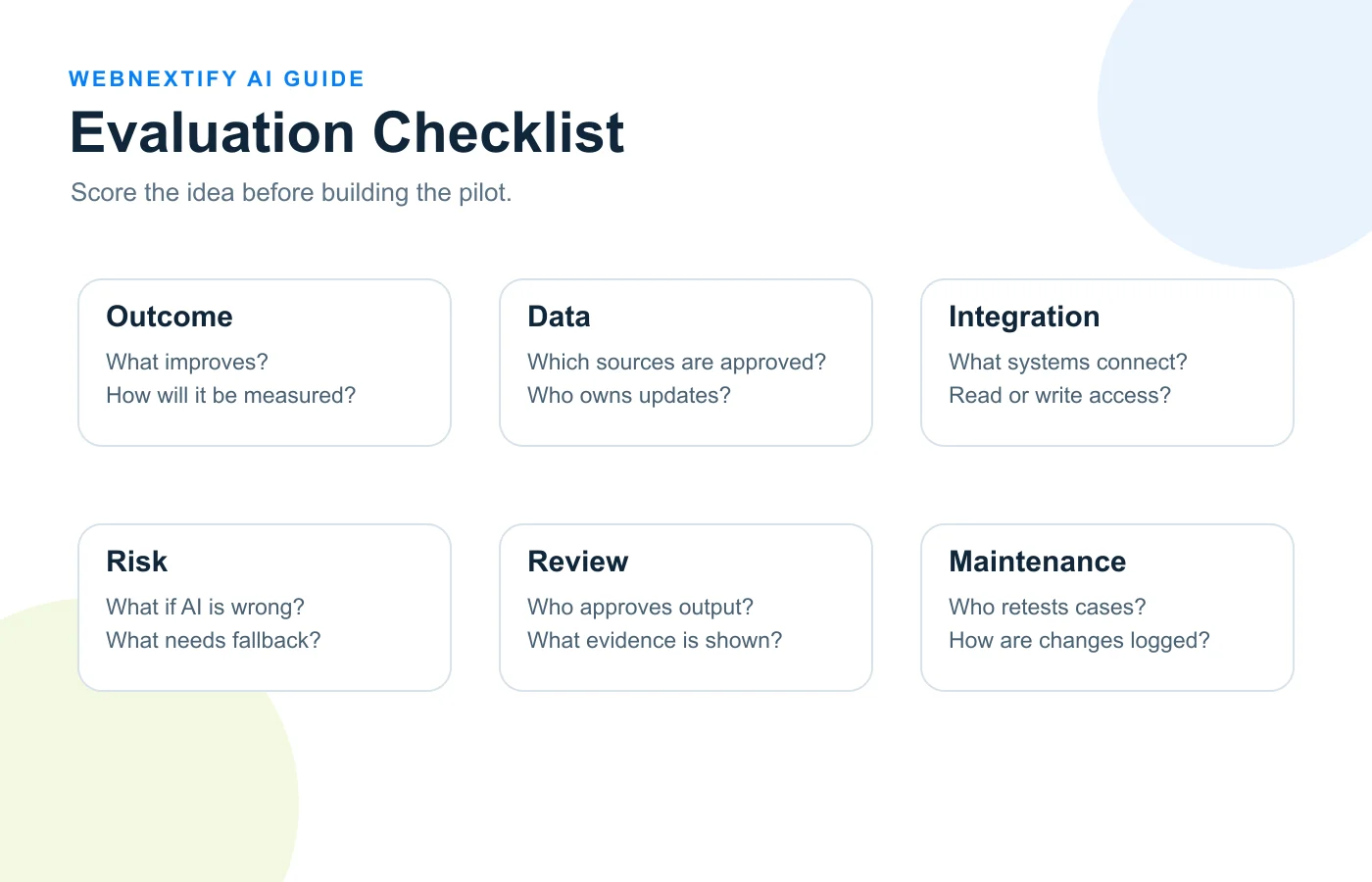
Use this evaluation sequence:
- Define the business problem and the user affected by it.
- Record the current baseline, such as handling time, correction rate, response time, rework or escalation rate.
- Confirm which data the solution needs and who owns that data.
- List every system the solution must read from or write to.
- Check access permissions and whether the system receives more data than the task requires.
- Define what happens when the output is wrong, incomplete or uncertain.
- Place human approval where it can prevent a meaningful error or unauthorized action.
- Define fallback behavior for unavailable models, APIs or source systems.
- Assign ongoing responsibility for source updates, testing, monitoring and vendor changes.
- Set the evidence required before the pilot expands to more users, data or actions.
Security and privacy evaluation should follow the actual data flow. Ask what enters the model, what is stored, what third-party services receive, which users can retrieve it and which downstream systems can be changed. A vendor's general security statement does not answer whether a specific implementation gives the right people the right access.
Maintenance also matters. Models, prompts, source documents, APIs, permissions and business processes can change. A solution that performs well at launch still needs an owner who can review failures, update sources, retest important cases and decide whether a new capability should be allowed.
A Simple AI Solution Decision Framework
Use these questions before selecting a vendor or build approach:
- What business problem are we solving? This defines the outcome before selecting technology.
- Are fixed rules enough? If yes, evaluate traditional automation first.
- Does the task need company data or connected systems? This reveals integration and permission requirements.
- What happens if AI is wrong? This sets review, escalation and control requirements.
- Can success be measured before scaling? This creates objective pilot criteria.
The framework produces a practical path. A predictable task usually points toward automation. Variable inputs inside a stable process may fit AI-assisted automation. Repeated conversational questions may fit a chatbot. A unique multi-system process can justify custom AI integration. A workflow that requires several tool-based actions may justify an agent, but only when permissions, logging, failure handling and accountability match the consequences of those actions.
Example: Improving Customer Support Without Overbuilding
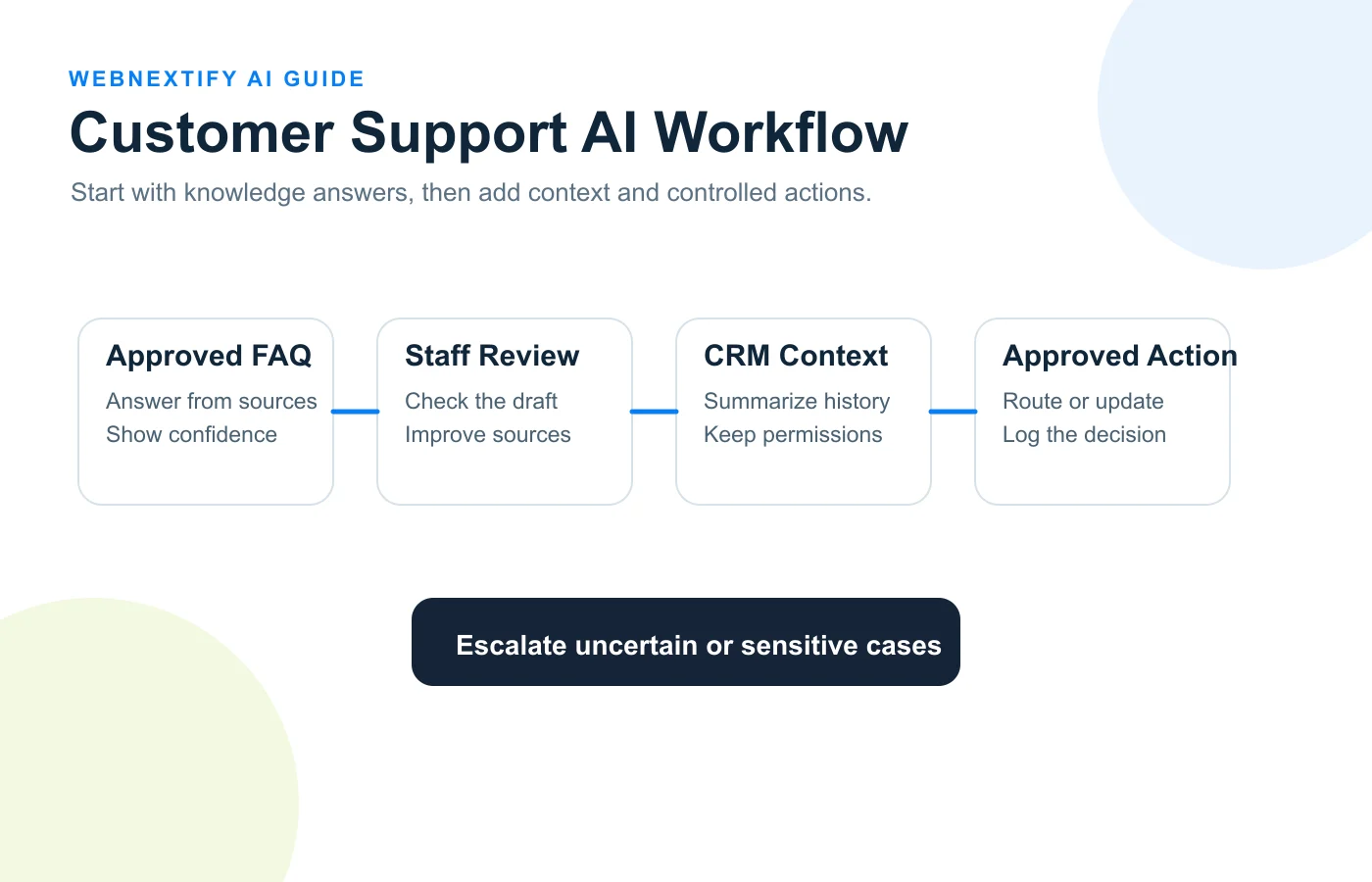
Consider an illustrative business that receives repeated product, billing, delivery and account questions. The company could begin with a knowledge assistant that answers only from approved FAQs and policy documents. Staff can review unanswered or weak responses and improve the source material before the system is given broader access.
The next stage could add internal product documentation and customer context for support staff. The AI might prepare a draft response or summarize a customer's recent history, while the support specialist remains responsible for sending the message. This tests whether additional context actually improves the workflow without allowing the AI to take sensitive actions.
If results are reliable, ticket classification and routing could be automated. A billing request could move to the correct queue, while uncertain cases are escalated. Later, tightly controlled actions might be considered, but refunds, account changes, contractual commitments or other consequential actions can remain behind explicit approval. The progression is based on evidence and risk, not on a goal of maximizing autonomy.
How To Introduce AI Into Business Operations
Start with one bounded workflow. Map the current trigger, inputs, systems, handoffs, decisions, exceptions, owner and final outcome. Record a baseline before changing the process. Then define exactly what the AI will do and what it will not do.
Run a pilot with limited users, data and actions. Review examples of good and poor output rather than relying only on an average score. Track corrections, escalations, time saved or added, rework and relevant user feedback. Expand only when the evidence supports a wider scope.
For the detailed process-mapping method, read WebNextify's AI Workflow Automation guide. For ownership, permissions, testing, monitoring and human review, see the AI Governance guide.
Common Mistakes When Choosing AI Business Solutions
Starting With A Product Instead Of A Problem
A compelling demo can encourage a team to search for somewhere to use the tool. Reverse that order. Define the process and outcome first, then evaluate whether AI is required and which solution type fits.
Automating A Broken Process
If nobody agrees on the steps, source data, owner or exception handling, automation can hide the problem rather than fix it. Document the real workflow before connecting AI.
Underestimating Integration Work
The model may be only one component. Authentication, APIs, data access, logging, user interfaces, retries, monitoring and error handling can determine whether the solution works in daily operations.
Giving AI Unnecessary Autonomy
Do not grant write access or external actions simply because an agent can use them. Give the system only the permissions required for the approved task and keep meaningful review where consequences justify it.
Scaling Before Measuring
A pilot should answer a business question. If the team cannot show whether quality, handling time, rework, response speed or another agreed metric improved, expanding the same design adds scale without adding evidence.
Frequently Asked Questions
What Is An AI Business Solution?
What Is The Difference Between AI Integration And AI Automation?
Does Every Business Need A Custom AI Solution?
When Should A Business Use An AI Chatbot?
How Do You Know Whether An AI Solution Is Worth Implementing?
If your evaluation points toward conversational support, lead qualification or a connected assistant, WebNextify's AI chatbot service covers custom chatbot design, API integration, website and WhatsApp integration, lead qualification and ongoing monitoring.
Conclusion
The right AI business solution fits the problem, workflow, data, integrations, risk and measurable outcome, not the most advanced technology label. Use fixed rules where they are enough, add AI where variable information or judgment support creates useful value, and choose custom integration or agents only when the requirement justifies the added control and maintenance. Start with a bounded problem, test it against real work and let evidence determine the next step.