
Google Webmaster Tools is now Google Search Console. If you are trying to add a webmaster tools site, check indexing, submit a sitemap or review search keywords, Search Console is the current Google tool to use.
The name changed, but the need is still the same. Website owners need a reliable way to see whether Google can find their pages, how those pages appear in Search and which issues need attention before SEO work can improve.
Is Google Webmaster Tools Still Available?
Google Webmaster Tools is no longer the current product name. Google renamed it Google Search Console in 2015 so the tool would speak to more than technical webmasters. If you see older guides mention Webmaster Tools, they are usually talking about Search Console.
Google also moved its education and documentation branding from Google Webmasters to Google Search Central in 2020. That means the modern ecosystem has two related names: Search Console is the tool, and Search Central is the documentation and learning hub.
For practical work, use Search Console when you want to verify a site, submit a sitemap, inspect a URL, review Google Search traffic or check indexing and security alerts.
What Search Console Helps You Do
Search Console helps website owners monitor, maintain and troubleshoot a site's presence in Google Search. It does not guarantee rankings, but it gives you data and diagnostics that can guide better SEO decisions.
You can use Search Console to:
- Confirm Google can discover important pages.
- Review indexing issues.
- Inspect individual URLs.
- Submit sitemaps.
- Monitor clicks, impressions, CTR and average position.
- Find queries and pages that are gaining or losing visibility.
- Review manual actions and security issues.
- Check examples of external links.
- Export data for SEO reports.
Think of it as your direct view into how Google Search sees your website. It is not the only SEO tool you need, but it is one of the first tools you should set up.
How To Add And Verify Your Website
To use Search Console, you add a property and verify ownership. Verification matters because the tool can show private search data and site diagnostics.
There are two common property types:
- Domain property: covers all protocols and subdomains for a domain, such as example.com, www.example.com, http and https.
- URL-prefix property: covers only the exact URL prefix you enter, such as https://www.example.com.
A domain property is often cleaner for a business website because it gives a wider view. A URL-prefix property can still be useful when you need to verify a specific section, protocol or subdomain.
Common verification methods include DNS records, HTML file upload, HTML meta tag, Google Analytics and Google Tag Manager. The right method depends on what access you have. If you control DNS, domain verification is usually the most complete option. For technical setup help, a website development team can make sure the right property, sitemap and site version are connected.
Quick Setup Checklist
- Choose a Domain property if DNS access is available.
- Verify ownership.
- Submit the XML sitemap.
- Inspect the homepage.
- Inspect one important service or product page.
- Review whether important pages are indexed.
- Check manual actions and security issues.
- Wait for data to populate if the property is new.
How To Use Google Webmaster Tools For SEO Optimization
Use Search Console as a practical SEO diagnostic tool. Start with performance changes, then inspect the affected pages and decide what needs to be fixed.
A simple workflow looks like this:
- Open the overview and look for major warnings.
- Review the Performance report for clicks, impressions, CTR and average position.
- Compare queries and pages against the previous period.
- Identify pages with high impressions but low CTR.
- Inspect pages that should be indexed but are not getting visibility.
- Fix page titles, content gaps, internal links or technical issues.
- Request indexing only when a meaningful page has changed.
- Review the same page again in the next reporting period.
This keeps Search Console connected to real work. The goal is not to stare at charts every day. The goal is to find the next useful action. WebNextify's SEO services can help turn those checks into technical fixes, content updates and clearer reporting.
How To Find Content Keywords In Search Console
Search Console does not work like a traditional keyword research database. It shows queries that already generated impressions or clicks for your site in Google Search. That makes it useful for improving existing pages.
Start with the Performance report. Open queries, then compare them with pages. Look for patterns like:
- High impressions and low CTR.
- Queries where the wrong page is ranking.
- Queries close to your offer but not answered clearly on the page.
- Long-tail searches that reveal real customer language.
- Branded queries that should be separated from non-branded growth.
- Pages ranking for mixed topics that may need clearer structure.
For example, if a service page receives impressions for "technical SEO audit checklist" but the page only talks about general SEO services, you may need a clearer section, a supporting article or better internal links.
Query-To-Content Workflow
- Open the Performance report.
- Filter by page.
- Review the queries for that page.
- Find high-impression queries with low CTR.
- Separate branded queries from non-branded searches.
- Add missing answers, improve page titles or strengthen internal links.
- Recheck the page in the next monthly report.
Use query data carefully. Search Console may hide some queries for privacy, and it shows data connected to your own site, not the whole market. For new content planning, combine Search Console with keyword research tools, competitor review and customer questions.
Can Google Webmaster Tools Check Backlinks?
Search Console includes a links report, so yes, it can show useful backlink data. It can show examples of external links, top linked pages, top linking sites and anchor text.
Search Console links data is useful for examples and top linked pages, but it is not a full backlink quality, spam or competitor gap audit.
Use Search Console links data to answer basic questions:
- Which pages attract the most links?
- Which external sites link to your website?
- Are important pages earning any external links?
- Do anchor text patterns look natural?
- Are there unusual linking sites worth reviewing?
For serious link risk, spam review or competitor gap analysis, use the links report as one input, not the whole answer.
Search Console Reports Worth Checking Monthly
Most website owners do not need to check every report every day. A monthly Search Console review is enough for many stable websites, while launches, migrations and technical fixes may need more frequent checks.
If these checks expose a wider crawl, indexation, architecture, or prioritization problem, a professional SEO audit service can turn the evidence into an implementation plan.
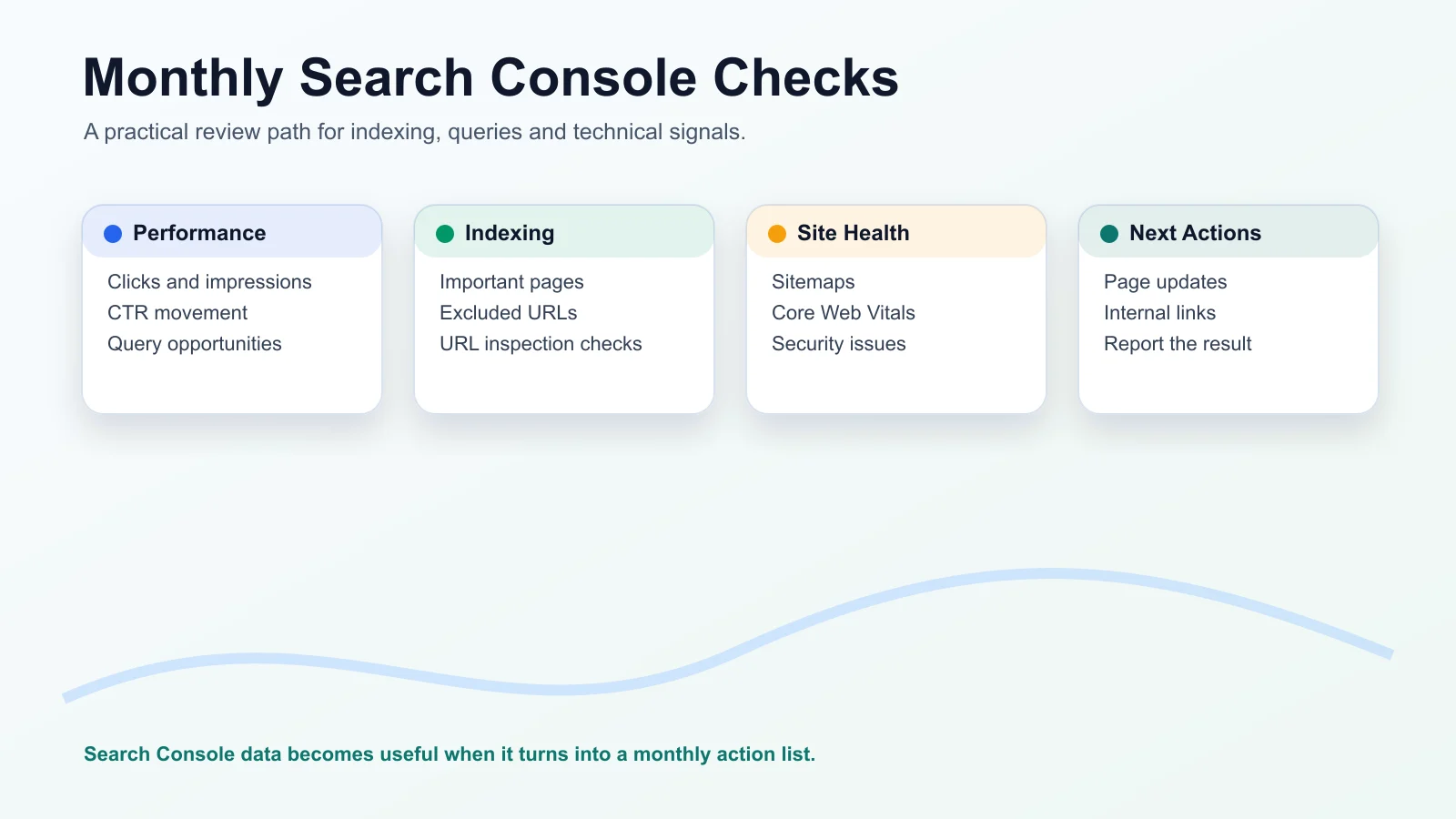
A practical monthly review should include:
- Performance: clicks, impressions, CTR, average position, queries and pages.
- Pages and indexing: important indexed pages, excluded pages and new issues.
- Sitemaps: submitted sitemap status and discovered URLs.
- URL Inspection: spot checks for important pages.
- Core Web Vitals: page experience issues where data is available.
- Manual actions: serious policy or quality issues.
- Security issues: malware, hacked content or other security warnings.
- Links: top linked pages and linking sites.
Keep notes each month. Search Console is more useful when you record what changed on the website, which pages were updated and what you expect to happen next. If you need a reporting structure, use a practical SEO report template to turn Search Console checks into a client-friendly summary. For report interpretation and quality checks, use the SEO reporting best practices guide.
Google Search Console, Bing Webmaster Tools And Yandex Webmaster
Google Search Console shows data for Google Search. Bing Webmaster Tools and Yandex Webmaster are separate tools for other search engines and markets.
Use Bing Webmaster Tools when Bing visibility matters to your audience. It can help with site submission, crawl insights, backlinks, keyword data and search performance for Bing.
Use Yandex Webmaster when your target market uses Yandex. It is not a replacement for Search Console because each search engine has its own crawling, indexing and reporting systems.
For most US-focused websites, Google Search Console should be the first setup. Bing Webmaster Tools can be a useful second tool. Yandex is mainly relevant when the market and audience make it useful.
What Search Console Can And Cannot Do
Search Console is essential, but it has limits. Understanding those limits prevents bad decisions.
Search Console Can
- Show Google Search clicks, impressions, CTR and average position.
- Show indexing and sitemap issues.
- Inspect individual URLs.
- Show examples of external links.
- Provide query and page data for reporting.
Search Console Cannot
- Guarantee rankings or indexing.
- Show every keyword in the market.
- Replace GA4 for after-click behavior.
- Replace a full technical crawl.
- Provide complete competitor backlink analysis.
Search Console does not show every possible keyword in your market. It mainly shows queries connected to your site. Some query data can be anonymized or filtered for privacy.
Average position is not a fixed rank. It is an average across the selected data, and real search results can vary by location, device, query wording and result features.
Clicks in Search Console and sessions in GA4 will not always match. Search Console measures Google Search clicks before the visit. GA4 measures website sessions and user behavior after the visit.
Requesting indexing does not guarantee indexing or ranking. It only tells Google that a URL should be crawled or reviewed.
Search Console also does not replace a crawler. A crawler can help inspect internal links, templates, status codes, metadata, canonical tags and technical patterns across the site.
A Simple Search Console Workflow For Better SEO
A useful workflow starts with a question, not a report.
Start here:
- What changed in search performance?
- Which queries or pages caused the movement?
- Is the right page showing for the right query?
- Is the page indexed and technically accessible?
- Does the page answer the search intent well?
- Does the title encourage the right click?
- Are internal links helping Google and users reach the page?
- What should be changed, and when will it be reviewed again?
For a content update, the workflow might be simple. Find a page with high impressions and low CTR. Review the queries. Improve the title and introduction if the page already satisfies the intent. Add missing sections if the queries show unanswered questions. Strengthen internal links from relevant pages. Then monitor the page in the next monthly report.
For an indexing issue, the workflow is different. Inspect the URL, check whether it is crawlable, review canonical signals, confirm sitemap inclusion and fix technical blockers before requesting indexing.
That is where Search Console becomes useful for SEO optimization. It helps you connect a visible issue to a specific page and a specific next action.
Common Questions Website Owners Ask About Search Console
Is Google Webmaster Tools The Same As Search Console?
Yes. Google Webmaster Tools was renamed Google Search Console in 2015. Older guides may still use the old name, but the current Google tool for site verification, indexing checks and search performance is Search Console.
Do I Need To Submit Every New URL Manually?
Usually, no. A clean sitemap and crawlable internal links help Google discover new pages. URL Inspection and indexing requests are useful for important updated pages, urgent fixes or pages that are not being discovered, but they do not guarantee indexing.
Why Is My Page Indexed But Not Getting Clicks?
Indexing only means Google knows about the page and may include it in search results. Clicks depend on search demand, ranking position, title relevance, result appearance, competition and whether the page matches the query intent.
Why Do Impressions Increase While Clicks Stay Low?
This can happen when a page appears for more searches but ranks too low, has a weak title, does not match the query closely or appears for informational searches with low click intent. Review queries, pages, CTR and average position together.
Why Does Average Position Not Match My Manual Search?
Average position is not a fixed rank. It is averaged across queries, users, locations, devices and search result layouts. A manual search is only one view of a result at one moment.
Can Search Console Replace Keyword Research Tools?
No. Search Console shows queries connected to your own site. It is excellent for improving existing pages, but it does not show the full market, competitor demand or every keyword opportunity.
Can Search Console Show All Backlinks?
Search Console can show useful link examples, top linked pages and linking sites. It should not be treated as a complete backlink quality, spam or competitor link analysis tool.
Does Requesting Indexing Guarantee Ranking?
No. Requesting indexing asks Google to crawl or review a URL. It does not guarantee indexing, ranking, traffic or a specific timeline.
How WebNextify Can Help
WebNextify helps businesses set up Search Console, connect it with GA4, review indexing issues and turn search data into clear SEO priorities. The work can include sitemap checks, technical SEO review, content opportunity analysis, reporting setup and page-level recommendations.
If your Search Console data is hard to interpret, the next step is not always another tool. Sometimes the better move is a clearer workflow: check the right reports, understand the limits, fix the right pages and measure the result over time. You can contact WebNextify when you want help turning those findings into practical work.
Conclusion
Google Webmaster Tools now points to Google Search Console, and the value is not just access to data. The real value is knowing how to use that data to check indexing, understand search queries, improve important pages and make better SEO decisions without assuming the tool can guarantee rankings.