
An SEO report template should help someone understand whether search work is moving in the right direction, what caused the change and what needs attention next. The best template is not the one with the most charts. It is the one a client, founder or marketing lead can read quickly and use to make a decision.
A useful SEO report template combines Search Console data, website analytics, keyword movement, completed work and a short action plan. If you want to see completed sample formats before building your own, review the SEO report examples guide. Agencies adapting that structure for delivery can also use the agency client reporting guide. It keeps the same structure each month, but the commentary changes based on what actually happened.
What Is an SEO Report Template?
An SEO report template is a reusable structure for explaining search performance, SEO work, risks and next actions. It gives every monthly report a consistent order so readers can compare progress over time without learning a new layout each month.
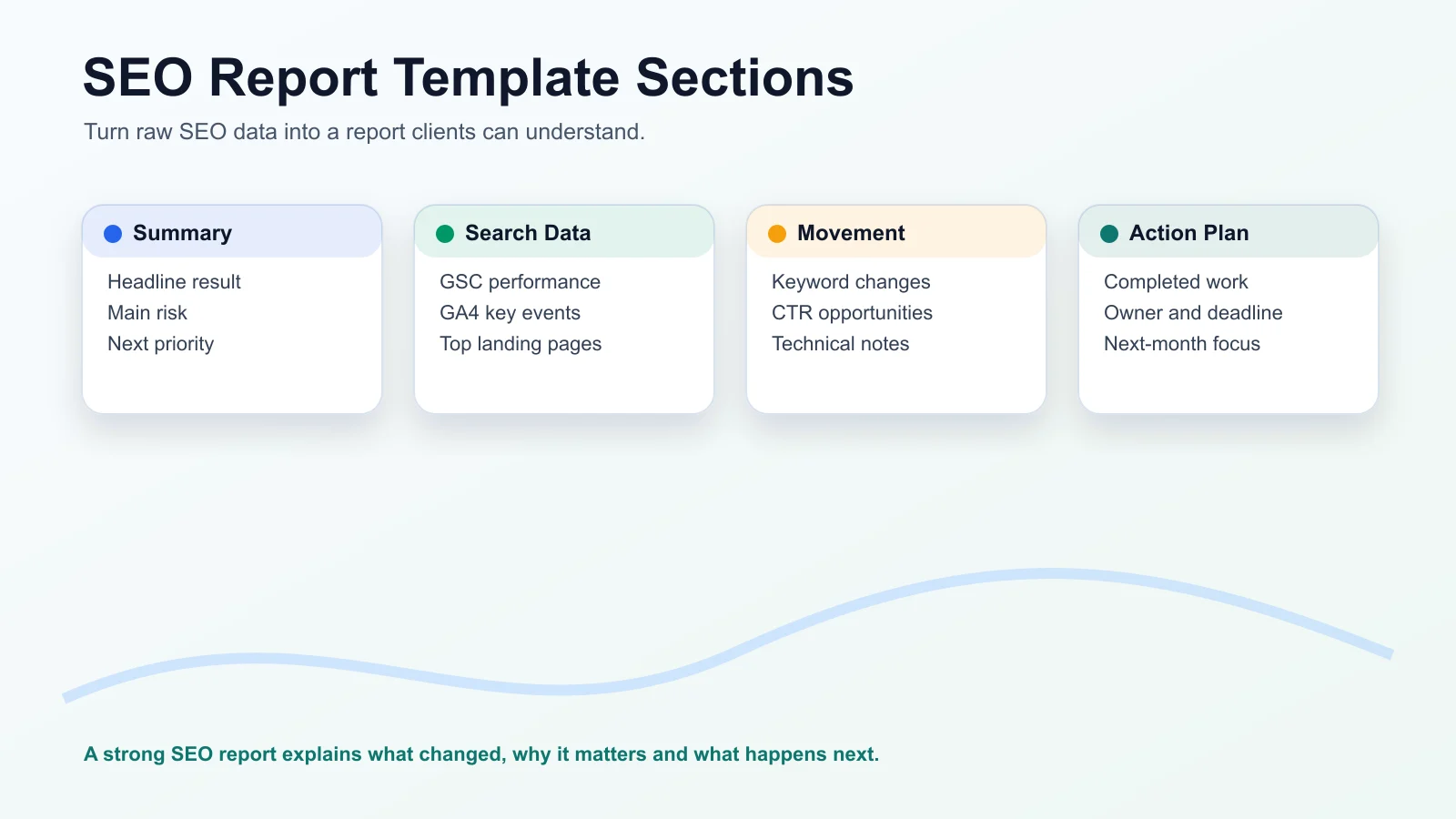
The template usually includes the reporting period, a plain-English summary, organic search metrics, keyword movement, top pages, conversions or key events, technical health, completed work and the next plan. The format can be a PDF, spreadsheet, Google Doc, slide deck or Looker Studio dashboard, but the purpose stays the same: make SEO easier to understand and easier to act on.
A good template separates three things:
- What the data says.
- What the team believes caused the change.
- What should happen next.
That separation matters because SEO data is rarely perfect. Search Console, GA4 and rank trackers measure different parts of the journey. A strong report labels sources clearly instead of pretending every number should match.
What Should an SEO Report Template Include?
A useful SEO report template should include the sections a decision-maker needs first, then the supporting detail. Start with the business story, not a raw export.
Reporting Period And Scope
Every report should state the client or website name, domain, reporting period, comparison period, country or market when relevant and the data sources used.
For example:
Client: Acme Services
Domain: acme.example
Reporting period: August 1 to August 31, 2026
Comparison: July 1 to July 31, 2026
Sources: Google Search Console, GA4, rank tracker, site audit notes
This prevents confusion later. If one report compares month over month and another compares year over year, the trend can look very different.
Executive Summary
The executive summary is the section many clients will read first and sometimes the only section they read closely. Keep it short, direct and tied to outcomes.
A practical summary should cover:
- The headline result.
- The main positive movement.
- The main risk or decline.
- The likely reason, with caveats where needed.
- The next priority.
Organic search clicks increased this month, mainly from stronger visibility on service-related pages. Non-branded impressions also improved, but two important pages lost CTR and need title and meta description updates. Next month, the priority is to refresh those pages and complete the internal link updates already planned.
Organic Search Performance
This section should show whether search visibility and traffic changed. Use Search Console for Google Search performance and GA4 for what visitors did after arriving.
Useful metrics include:
- Clicks from Google Search.
- Impressions.
- CTR.
- Average position.
- Organic sessions.
- Engaged sessions or engagement rate where useful.
- Organic key events, leads, purchases or form submissions.
Do not treat every metric as equally important. For many business reports, clicks, qualified landing pages and key events matter more than a long list of rankings.
Keyword Rankings And Query Movement
The ranking section should focus on priority keywords and query groups, not every tracked phrase. Include the terms tied to services, products, content clusters or local markets that matter to the business.
A practical ranking report can include keyword or query group, current position, previous position, target page, search intent and notes. The notes column is important. A position change without context can lead to the wrong decision. If a keyword moved down but clicks stayed stable, the issue may not be urgent. If impressions rose but CTR fell, the page title or search result fit may need attention.
Top Landing Pages
Landing pages show which pages are earning visibility and whether visitors take useful actions after arriving. This section should connect Search Console page data with GA4 behavior where possible.
A useful landing page section can include page URL, search clicks, organic sessions, key events, change from the previous period and commentary. Use it to show which pages deserve updates, internal links, conversion improvements or new supporting content.
Conversions And Key Events
SEO reporting becomes more useful when it connects search activity to business actions. In GA4, key events can represent important actions such as form submissions, purchases, calls, sign-ups or other meaningful outcomes.
The report should explain what counts as a key event and whether attribution has limitations. For example, a lead may discover the site through Google Search, return later through direct traffic and then submit a form. The report should avoid claiming perfect one-click attribution when the buying journey is longer.
Technical Health
Technical SEO belongs in the report when it affects visibility, crawling, indexing, user experience or the next work plan. The main report does not need a full crawl export.
Include only the issues that matter:
- Important pages blocked or not indexed.
- Broken internal links on high-value pages.
- Redirect problems.
- Core Web Vitals issues when they affect key pages.
- Duplicate or missing titles on important pages.
- Sitemap or canonical problems.
Put raw crawl data in an appendix if the client needs it.
Work Completed And Next Priorities
A report should show what was done, not only what changed. Completed work helps the reader connect effort to progress.
Instead of writing "technical SEO work completed," write something more specific:
- Fixed broken internal links on the pricing and service pages.
- Updated title tags on five high-impression pages with low CTR.
- Added internal links from three blog posts to the main SEO services page.
- Submitted updated sitemap after publishing two new articles.
The next priorities should include an owner, purpose and dependency where useful. A report that ends with "continue optimization" is too vague. A better next action is "Refresh the top three pages with declining CTR, owner: SEO lead, dependency: updated service positioning."
Monthly SEO Report Template Structure
A monthly SEO report should be consistent, selective and easy to compare with the previous month. Organic search can move slowly, so monthly reporting often gives a better decision window than weekly reporting.
A simple monthly structure can look like this:
- Cover and scope.
- Executive summary.
- Search performance snapshot.
- GA4 organic traffic and key events.
- Priority keyword movement.
- Top landing pages.
- Technical health notes.
- Work completed.
- Next-month priorities.
- Appendix.
Weekly SEO updates can still be useful during a website launch, migration, technical incident or fast-moving campaign. They should flag urgent movement, blockers and actions, not replace the full monthly report. The cadence section below shows how daily, weekly and quarterly formats differ from the monthly one.
Smallest Useful SEO Report Template
If you need a simpler starting point, use this smaller structure before building a detailed report:
- Reporting period: website, date range, comparison range and data sources.
- Executive summary: three to five sentences explaining what changed and what matters.
- Search Console snapshot: clicks, impressions, CTR and average position.
- GA4 organic traffic: organic sessions, landing pages and key events.
- Priority keyword movement: important gains, losses and query opportunities.
- Work completed: specific tasks finished during the reporting period.
- Next-month priorities: actions with owner, reason and dependency.
SEO Report Format by Cadence: Daily, Weekly, Monthly and Quarterly
The right SEO report format depends on how often the report is sent. A daily report and a quarterly review are different documents with different readers. Copying the monthly layout into either one usually produces noise.
| Cadence | Main reader | What it covers | Typical length |
|---|---|---|---|
| Daily work report | Team lead or project manager | Tasks done, pages touched, blockers | One short table |
| Weekly report | Account manager or marketing lead | Urgent movement, work done, next week's tasks | Half a page |
| Monthly report | Client or business owner | Performance, key events, work completed, next priorities | Two to six pages |
| Quarterly report | Founder, director or budget holder | Trends, what worked, what to change, next quarter's plan | Five to ten pages plus appendix |
SEO Daily Work Report Format
A daily SEO work report is a work log, not a performance report. Rankings and clicks move every day for reasons that cannot be explained from one day of data, so reporting them daily invites overreaction. What a manager can usefully review each day is the work itself.
A practical daily format uses one row per task:
| Date | Task | Page or URL | Type | Status | Time spent | Notes or blockers |
|---|---|---|---|---|---|---|
| 2 Oct | Rewrote title and meta description | /seo-services | On-page | Done | 40 min | Old title was 72 characters and cut off in results |
| 2 Oct | Fixed six broken internal links | Blog articles | Technical | Done | 25 min | Links pointed to retired URLs |
| 2 Oct | Built guest post prospect list | None | Off-page | In progress | 1 hr | Waiting for publisher list approval |
Make task names specific enough that someone reading the monthly report later can trace the work back to the log. "On-page optimization" tells the reader nothing. "Rewrote title on /seo-services" does.
Weekly SEO Report Format
A weekly SEO report format should fit on half a page:
- Anything urgent: indexing errors, traffic drops on key pages, broken forms or lost tracking.
- Work completed this week, pulled from the daily log.
- Notable movement only, with a one-line explanation.
- Next week's tasks and anything blocking them.
Leave full performance tables for the monthly report. A week is usually too short to judge whether SEO work is succeeding.
Monthly SEO Report
The monthly report is the template covered above. For a full walkthrough of metrics and workflow, see the monthly SEO report guide.
Quarterly SEO Report
A quarterly SEO report steps back from month-to-month movement. Three months of data is usually enough to separate a trend from noise, and a year-over-year comparison becomes more useful because seasonality affects both periods.
A quarterly report usually covers:
- Organic clicks, key events and leads for the quarter, compared with the same quarter last year.
- Which pages and topics grew, and which declined.
- Which work produced results and which did not.
- Changes to priorities, budget or the content plan for the next quarter.
This is the report where it is reasonable to recommend stopping work that has not shown results.
SEO Ranking Report Template: What To Track
An SEO ranking report template should track priority keywords, current position, previous position, landing page, search volume, intent and commentary. The main report should not include hundreds of keywords unless the reader specifically needs that level of detail.
A strong ranking table includes keyword, intent, target page, current position, previous position, change, search volume, clicks or impressions and commentary.
The commentary makes the table useful. A ranking report should answer questions like:
- Did the right page rank?
- Did movement happen on a keyword that matters commercially?
- Did clicks move with rankings?
- Is the query becoming more visible but not earning clicks?
- Does the page need better content, stronger internal links or a clearer title?
Average position also needs careful wording. In Search Console, position is an average for the selected data, not a fixed rank that every user sees. Results can vary by location, device, personalization, query wording and search feature layout. Explain this plainly so the client does not compare one manual search with the report and assume the data is wrong.
SEO Analysis Report Template For Website Audits
An SEO analysis report template is different from a monthly performance report. It is usually used after an audit, before a redesign, during a migration or when a website needs a health check.
A website SEO analysis report should include:
- Audit scope.
- Crawl and indexation findings.
- Technical SEO issues.
- On-page content issues.
- Internal linking opportunities.
- Competitor or SERP observations.
- Priority recommendations.
- Implementation roadmap.
The SEO analysis report format should be more diagnostic than a monthly report. It can include issue severity, affected URLs, impact, recommended fix, owner and status.
A good audit report does not treat every issue as equally important. A missing meta description on a low-value page should not sit beside a blocked service page as if they carry the same risk. Prioritization is part of the value.
SEO Report Format: PDF, Excel Or Looker Studio?
The best SEO report format depends on how the report will be used. PDF, Excel, Google Sheets and Looker Studio each solve a different problem.
Use a PDF when the report is a curated deliverable. It is useful for clients, executives and board-style updates because it freezes the month, keeps the story controlled and is easy to share. To build an SEO report PDF template, set up the fixed headings in Google Docs, Word or Slides once, then export a new PDF each period so earlier reports stay unchanged.
Use Excel or Google Sheets when the report needs calculations, editable tables, imports or manual notes. This works well for agencies and in-house teams that want to review numbers before turning them into a final report.
Use Looker Studio when the team needs a dashboard connected to live or regularly refreshed data. It is useful for monitoring trends, combining Search Console with GA4 and giving stakeholders a place to check performance between reports.
Use a written report when interpretation matters. A dashboard can show that clicks dropped, but it will not always explain whether the cause was seasonality, a technical issue, a content change, a tracking change or a shift in demand.
Many teams use both: a Looker Studio dashboard for monitoring and a short monthly PDF or document for decisions.
How To Use Search Console And GA4 Data Correctly
Search Console and GA4 both belong in SEO reporting, but they answer different questions. Search Console explains how the website performed in Google Search before the visit. GA4 explains what visitors did after they arrived.
Search Console is useful for:
- Clicks.
- Impressions.
- CTR.
- Average position.
- Queries.
- Pages.
- Countries.
- Devices.
GA4 is useful for:
- Organic sessions.
- Landing page engagement.
- Key events.
- Revenue or lead actions where configured.
- Channel comparisons.
- User behavior after the click.
The numbers may not match. Search Console clicks and GA4 sessions are counted differently. Search Console query tables can omit some anonymized queries and may show different totals depending on grouping and filters. GA4 attribution settings can also affect how key events are credited.
Search Console shows Google Search visibility and clicks. GA4 shows on-site behavior and business actions. Use both together, but do not force them to match.
Common SEO Report Template Mistakes
The most common SEO reporting mistake is sharing data without interpretation. A report should reduce confusion, not move confusion into a prettier file. For broader reporting process guidance, see the SEO reporting best practices article.
Including Too Many Keywords
Every tracked keyword does not belong in the main report. Show priority terms, meaningful gains and losses, and query groups tied to business goals. Keep the full export in the appendix.
Hiding The Business Outcome
Traffic alone is not enough. If the site has goals or key events configured, show whether organic visitors are taking useful actions. If tracking is incomplete, say that clearly and make fixing measurement a priority.
Skipping The Explanation
A chart needs a sentence of meaning. Tell the reader what likely changed, what evidence supports that view and what remains uncertain.
Overusing Tool Scores
Tool scores can be useful, but only with context. A health score, authority score or visibility score should not replace actual findings, affected pages and recommended actions.
Ending Without A Next Action
A report that only looks backward feels like a receipt. End with the work that should happen next, who owns it and why it matters.
Quick Checklist Before Sharing
- The report period and comparison period are clear.
- Data sources are labeled.
- Search Console and GA4 numbers are explained separately.
- Priority keywords are limited to meaningful terms.
- Business actions or key events are included where configured.
- Completed work is specific.
- Next actions have an owner or responsible team.
- Raw exports are kept in the appendix.
Copy-Ready SEO Report Template
Use this structure as a starting point for a monthly report. Keep the placeholders, then replace them with real data and plain commentary.
Report Scope
Client: [Client name]
Domain: [Domain]
Reporting period: [Start date] to [End date]
Comparison period: [Previous period]
Prepared by: [Name or team]
Sources: [Search Console, GA4, rank tracker, crawl tool, CRM]
Executive Summary
[Write three to five sentences. State the headline result, biggest win, biggest concern, likely cause and next priority.]
Search Performance Snapshot
Metric: clicks
This period: [Value]
Previous period: [Value]
Change: [Change]
Commentary: [What changed and why it matters]
Metric: impressions
This period: [Value]
Previous period: [Value]
Change: [Change]
Commentary: [What visibility changed]
Metric: CTR
This period: [Value]
Previous period: [Value]
Change: [Change]
Commentary: [What may affect clicks]
Metric: average position
This period: [Value]
Previous period: [Value]
Change: [Change]
Commentary: [How to interpret movement]
GA4 Organic Traffic And Key Events
Metric: organic sessions
This period: [Value]
Previous period: [Value]
Change: [Change]
Commentary: [What changed after users arrived]
Metric: key events from organic traffic
This period: [Value]
Previous period: [Value]
Change: [Change]
Commentary: [What business action changed]
Metric: top organic landing page
This period: [URL]
Previous period: [Previous top page]
Change: [Change]
Commentary: [Why this page matters]
Priority Keyword Movement
Track keyword, intent, target page, current position, previous position, change and notes for each priority keyword. Keep the main list focused on terms that matter to the business.
Top Landing Pages
Track page, search clicks, organic sessions, key events, change and next action. Use this section to connect page movement with work the team can actually do.
Technical Health Notes
Track issue, affected pages, priority, recommended fix, owner and status. Keep the raw crawl export in the appendix.
Work Completed
- [Specific completed action and affected pages]
- [Specific completed action and expected purpose]
- [Specific completed action and related result]
Next-Month Priorities
Track priority, reason, owner, dependency and due date. This turns the report into a work plan instead of a static recap.
Appendix
Use the appendix for full keyword exports, crawl exports, backlink tables, page lists and detailed notes that do not need to interrupt the main story.
How WebNextify Can Help With SEO Reporting
WebNextify helps businesses turn SEO data into clearer reporting, technical priorities and content decisions. That can include setting up Search Console and GA4 reporting, reviewing website performance, building SEO dashboards, improving landing pages and creating a monthly reporting structure your team can actually use.
If your current report is hard to explain, the problem may not be the data. It may be the structure. A better reporting workflow can help your team see which pages need attention, which keywords matter, which fixes are complete and what should happen next.
Conclusion
A good SEO report template is not about adding more charts. It is about using a stable structure, reliable sources and plain explanations so the reader can understand performance and choose the next action with confidence.