
A useful monthly SEO report connects performance data, completed work, interpretation, and next-month actions.
A monthly SEO report should help someone understand what changed during the reporting period, why those changes matter, what SEO work was completed, and what should happen next. The strongest monthly reports are not collections of every available chart. They use a consistent structure, fair comparison periods, relevant metrics, clear commentary, and enough context to support decisions.
The report itself is only one part of the process. Useful monthly SEO reporting also requires a repeatable workflow for closing the reporting period, checking data quality, comparing performance, investigating important changes, separating completed work from observed results, setting priorities, reviewing the final report, and carrying unresolved issues into the next month.
What Is a Monthly SEO Report?
A monthly SEO report is a recurring summary of organic search performance for a defined monthly period.
It usually combines data from sources such as Google Search Console, Google Analytics, ranking tools, technical SEO systems, and business tracking systems where those sources are relevant.
A useful monthly report should answer five basic questions:
1. What changed?
2. Which pages, queries, or business areas contributed to the change?
3. What work was completed?
4. What problems or limitations remain?
5. What should happen next?
A monthly SEO report is different from a dashboard. A dashboard is useful for ongoing monitoring and may refresh daily or more frequently. A monthly report takes a defined period and interprets the most important changes.
A monthly report is also different from an SEO audit. An audit usually investigates the current technical, content, structural, or search condition of a website in greater depth. A monthly report tracks recurring performance and progress.
For broader guidance on report quality, interpretation, and common mistakes, see WebNextify's SEO Reporting Best Practices.
The Monthly SEO Reporting Cycle
Monthly SEO reporting works better as a repeatable operating cycle than as a document created from scratch every month.
| Stage | Main task |
|---|---|
| Close period | Define the reporting month and cutoff |
| Validate data | Confirm that major sources and tracking are usable |
| Compare | Choose fair comparison periods |
| Diagnose | Investigate meaningful changes |
| Write summary | Explain the main performance story |
| Record work | Document completed SEO activity |
| Set priorities | Define next-month actions |
| QA | Review numbers, claims, dates, and links |
| Deliver | Send or publish the approved report |
| Carry forward | Keep unresolved issues visible next month |
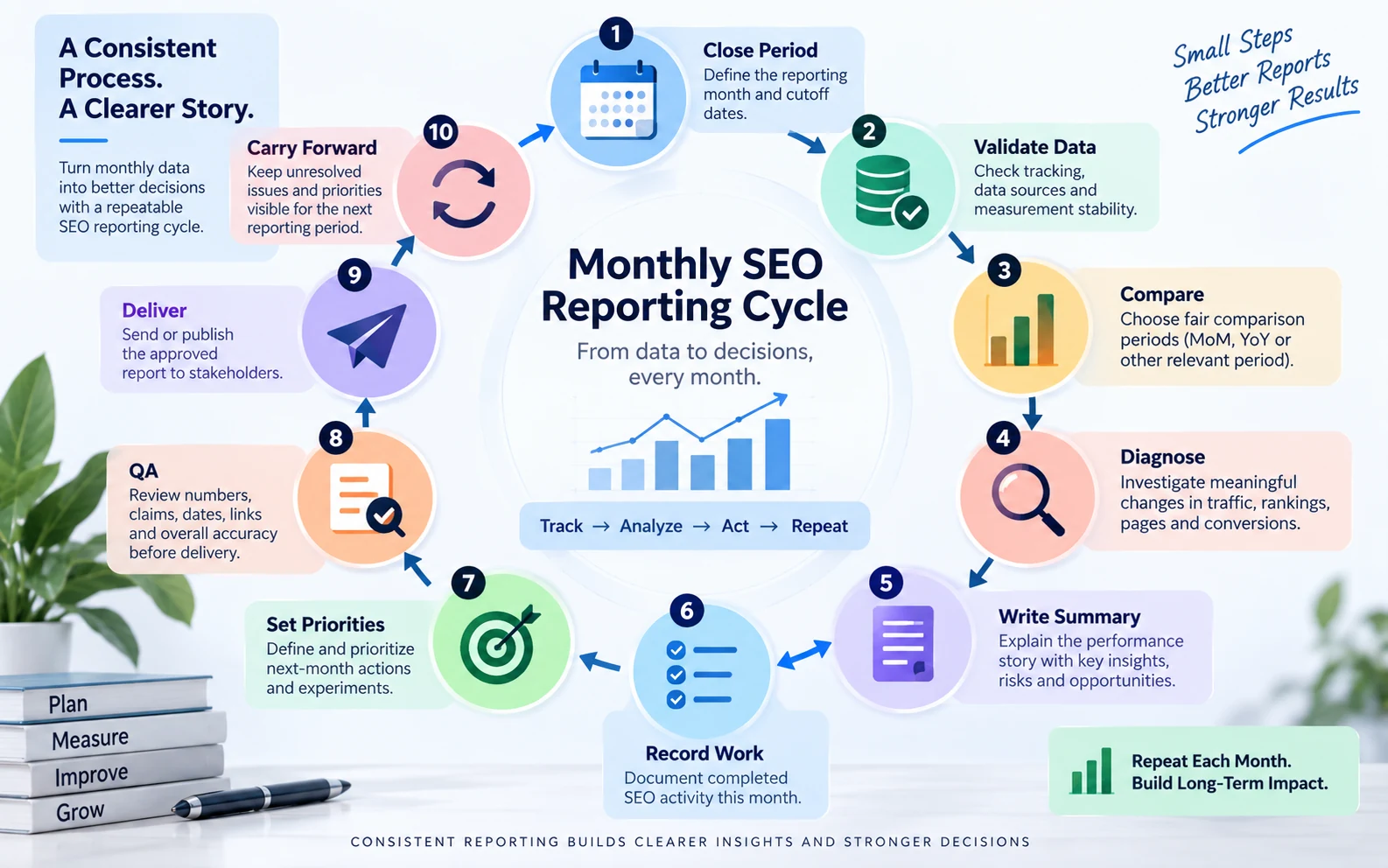
The monthly SEO reporting cycle keeps data validation, interpretation, delivery, and unresolved priorities connected.
This structure gives reporting continuity. Keep the structure stable while the commentary changes according to what actually happened.
What Should a Monthly SEO Report Include?
A useful monthly SEO report does not need every SEO metric. It should include the information required to explain performance and support decisions.
Reporting Period
State the exact dates covered by the report and the comparison period being used. The reader should never have to guess what two periods are being compared.
Executive Summary
The executive summary should explain the main story before the reader reaches detailed charts. It can cover overall direction of organic search performance, the most important positive change, the most important problem or risk, a business outcome where reliable data exists, and the main action for the next month.
Keep this section concise and focused on what deserves attention.
Organic Search Performance
Google Search Console provides search performance metrics including clicks, impressions, CTR, and average position. It can also break performance down by dimensions such as queries, pages, countries, and devices.
Use these metrics to answer whether search exposure changed, whether more or fewer users clicked, which pages drove the movement, which search themes changed, and whether the change was concentrated on one device or market.
Rankings and Visibility
Rankings can add useful context, especially for strategically important topics, services, products, or local searches. But rankings should not be shown without context.
Ask whether impressions changed, whether clicks moved with rankings, whether the correct page ranked, whether the keyword was commercially relevant, and whether search demand changed.
A ranking improvement without additional impressions or meaningful clicks needs different interpretation from movement on an important commercial query.
Landing-Page Performance
Sitewide traffic totals often hide the real story. Break important pages into groups such as service pages, product pages, location pages, commercial landing pages, informational content, or priority categories.
A site can have flat organic traffic overall while high-value service pages improve and low-value informational traffic declines. That is a different business story from a uniform sitewide decline.
Conversions and Business Outcomes
Where reliable tracking exists, include actions that matter to the business. Examples can include qualified leads, calls, bookings, purchases, trials, registrations, revenue, or other agreed key actions.
Avoid forcing an ROI conclusion if attribution or business tracking is incomplete. The report should state what is measured and where limitations exist.
Work Completed
Monthly reporting should document important SEO work completed during the period. This might include technical issues fixed, pages updated, internal links added, new content published, titles improved, structured data changes, migration work, or Search Console investigations.
Completed activity is valuable context, but it should not automatically be presented as the cause of performance changes.
Issues and Limitations
Include important factors that affect interpretation, such as tracking changes, incomplete conversion data, migrations, campaign timing, ranking-tracker configuration changes, major redesigns, or preliminary data.
The reader should know when two periods are not perfectly comparable.
Next-Month Priorities
Every important finding should lead to an action, decision, or monitoring plan. Instead of writing "Continue SEO optimization," use a specific next step tied to the evidence.
Monthly SEO Report Template
The following monthly SEO report template can be reused while allowing the commentary to change each month.
| Section | What to include |
|---|---|
| Reporting period | Exact dates and comparison period |
| Executive summary | Main result, risk, opportunity, next action |
| Business outcomes | Leads, sales, bookings, key events, or other agreed outcomes |
| Search performance | Clicks, impressions, CTR, relevant trends |
| Rankings and visibility | Priority search themes and meaningful movement |
| Landing pages | Pages or page groups driving gains and losses |
| Conversions | Relevant organic conversion behavior |
| Technical issues | Only issues that affect performance or upcoming work |
| Work completed | Important SEO activity completed during the month |
| Limitations | Tracking, measurement, or comparison constraints |
| Next-month priorities | Clear actions, owners, or investigations |
| Carry-forward items | Unresolved issues from earlier periods |
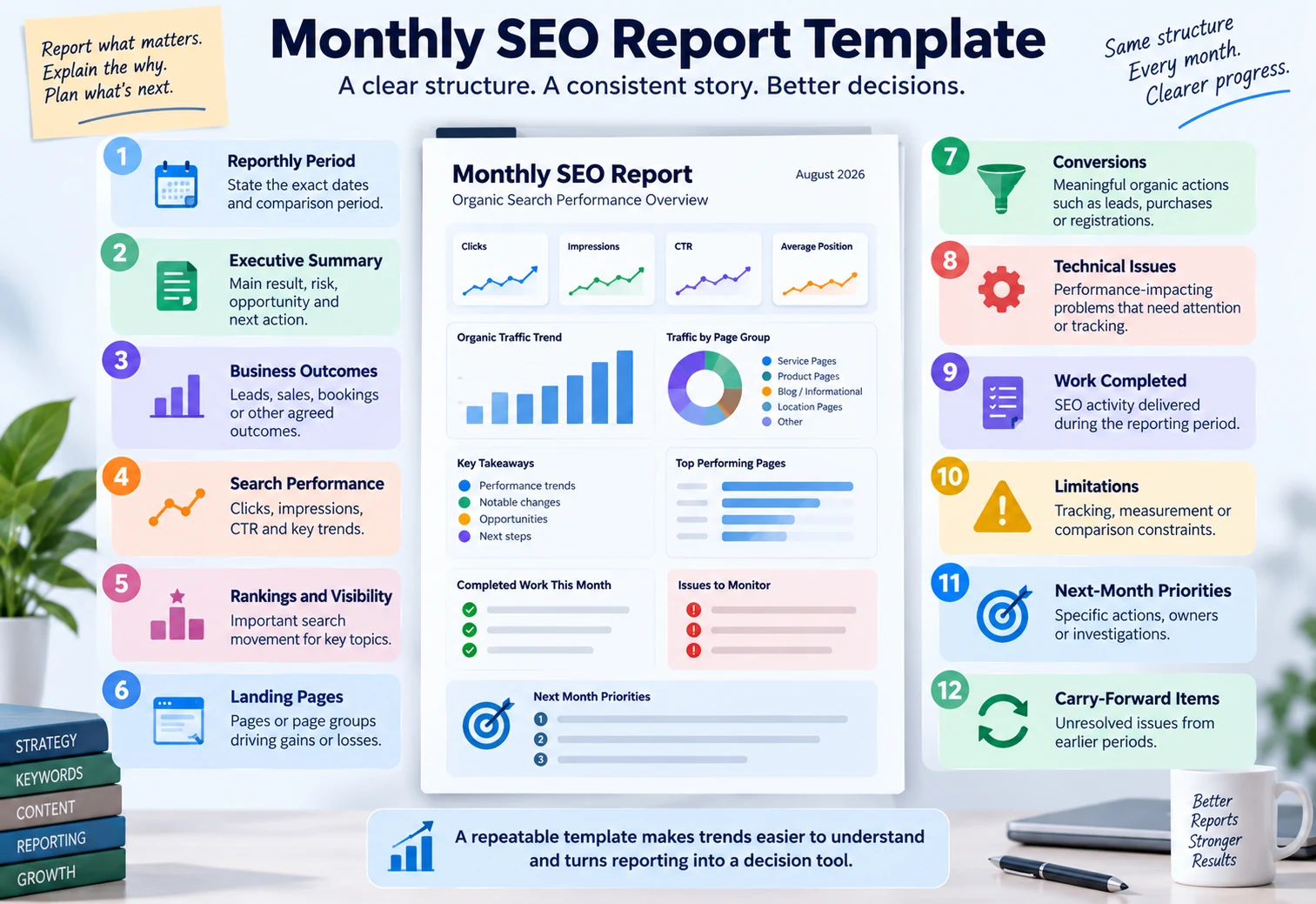
A repeatable monthly SEO report structure keeps reporting consistent while commentary changes with performance.
Keep the template recognizable from month to month so trends are easier to compare and selective metric reporting is less tempting.
For a broader reusable structure beyond monthly reporting, see WebNextify's SEO Report Template Guide.
Which Metrics Belong in a Monthly SEO Report?
The best monthly SEO report does not include a fixed universal set of metrics. Metric selection should follow the business question.
Search Console Metrics
Useful Search Console metrics can include clicks, impressions, CTR, average position, queries, pages, countries, and devices.
Search Console supports daily, weekly, and monthly chart granularity for longer-term trend analysis. Monthly periods are calendar months, and incomplete first or last periods can occur when a selected range does not align with month boundaries.
That matters when building monthly reports. A partial month should not be compared casually with a complete month.
For a practical Search Console workflow, see WebNextify's Google Webmaster Tools and Search Console Guide.
GA4 Metrics
Google Analytics can help explain what happened after acquisition. The GA4 Traffic Acquisition report is session-scoped and can show where sessions came from, including Organic Search.
Relevant metrics may include organic sessions, engaged sessions, engagement rate, key events, revenue where configured, and landing-page activity. Use metrics that support the report's business question.
Rankings and Visibility Metrics
Ranking and visibility tools can help track strategic keyword sets. State the tool, location, device, and keyword set when those factors materially affect the number.
A tool-defined visibility score should not be presented as though it were a universal Google metric.
Technical Health Indicators
Technical data belongs in the monthly report when it affects search performance, implementation priorities, or risk. Useful examples include important pages losing indexation, critical crawling problems, broken internal links on high-value pages, redirect or canonical problems, migration issues, or major Core Web Vitals problems on priority templates.
A monthly report usually does not need the full crawler export.
Month-over-Month vs Year-over-Year: Which Comparison Should You Use?
A monthly report does not automatically require only month-over-month comparison. The right comparison depends on the question.
| Comparison | Best used for | Main limitation |
|---|---|---|
| Month over month | Recent operational movement | Can be distorted by seasonality |
| Year over year | Seasonal businesses and recurring demand | Business or site may have changed significantly |
| Both | When one view alone could mislead | Requires concise explanation |
| Pre-change vs post-change | Migration, launch, technical fix, campaign | Other factors may also have changed |
| Page-group comparison | Understanding which site area moved | Requires consistent grouping |
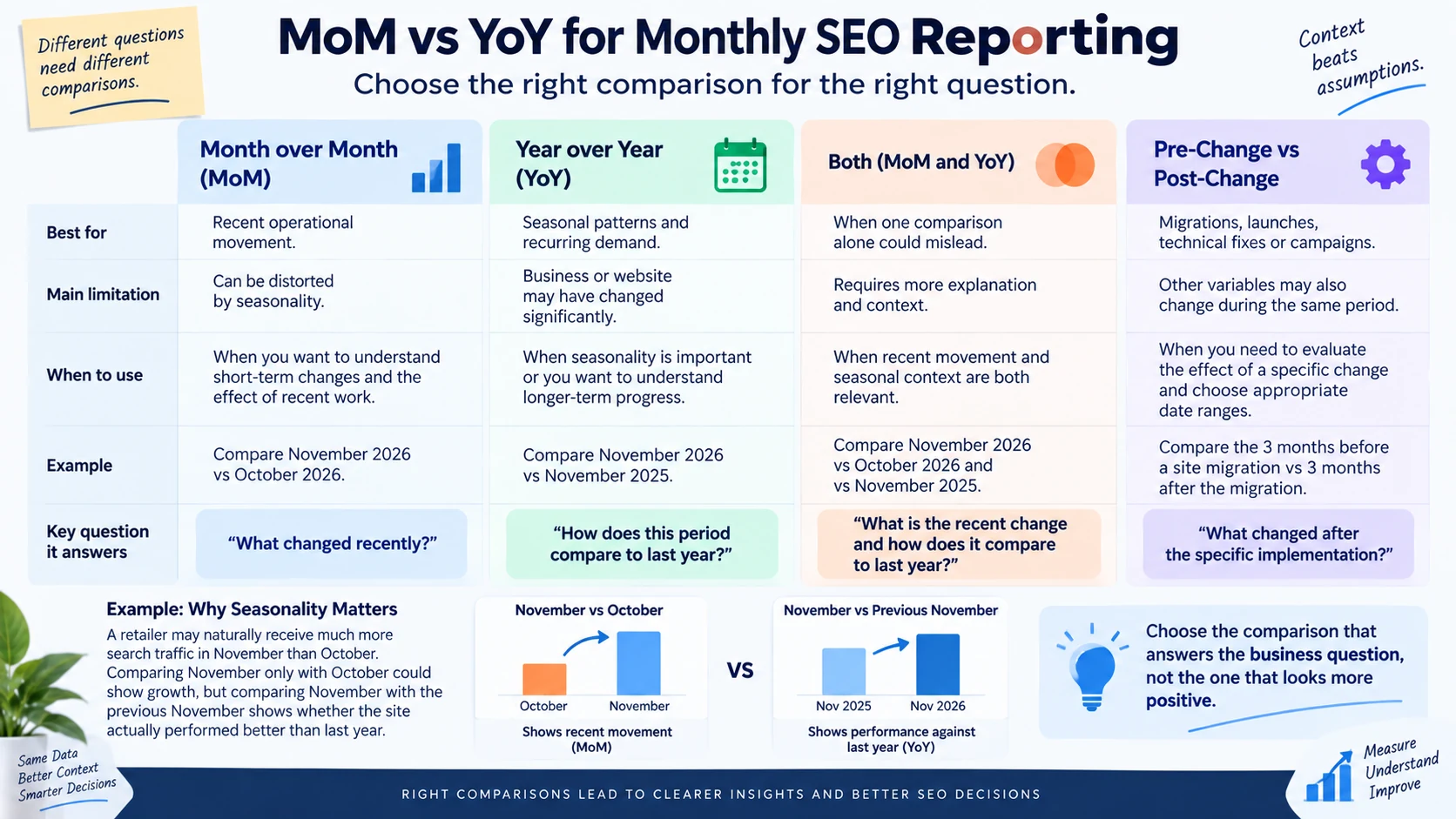
Monthly SEO reports should choose comparison periods based on the business question and seasonality.
Use month over month when you want to understand recent changes. Use year over year when seasonality is meaningful.
For example, a retailer may naturally receive much more search traffic in November than October. Comparing November only with October could show growth without revealing whether the site performed better or worse than the previous November.
A strong report can show both comparisons when they answer different questions. Do not switch comparison periods simply because one version looks more positive.
Month-End Data Cutoff and QA
Monthly reporting should begin with data validation.
Search Console documentation describes date and data-grouping behavior that can affect reporting. Its reporting interface distinguishes complete and incomplete periods, and its date handling should be understood before comparing monthly performance.
Before interpreting the month, check:
1. Is the reporting period complete?
2. Are the comparison periods equivalent?
3. Did analytics tracking change?
4. Did conversion or key-event definitions change?
5. Did the ranking tool change keywords, device, or location?
6. Did a migration, redesign, or deployment happen?
7. Is important business data missing?
8. Are filters consistent with the previous report?
9. Are any current figures preliminary or incomplete?
10. Is there a known technical incident that affects interpretation?
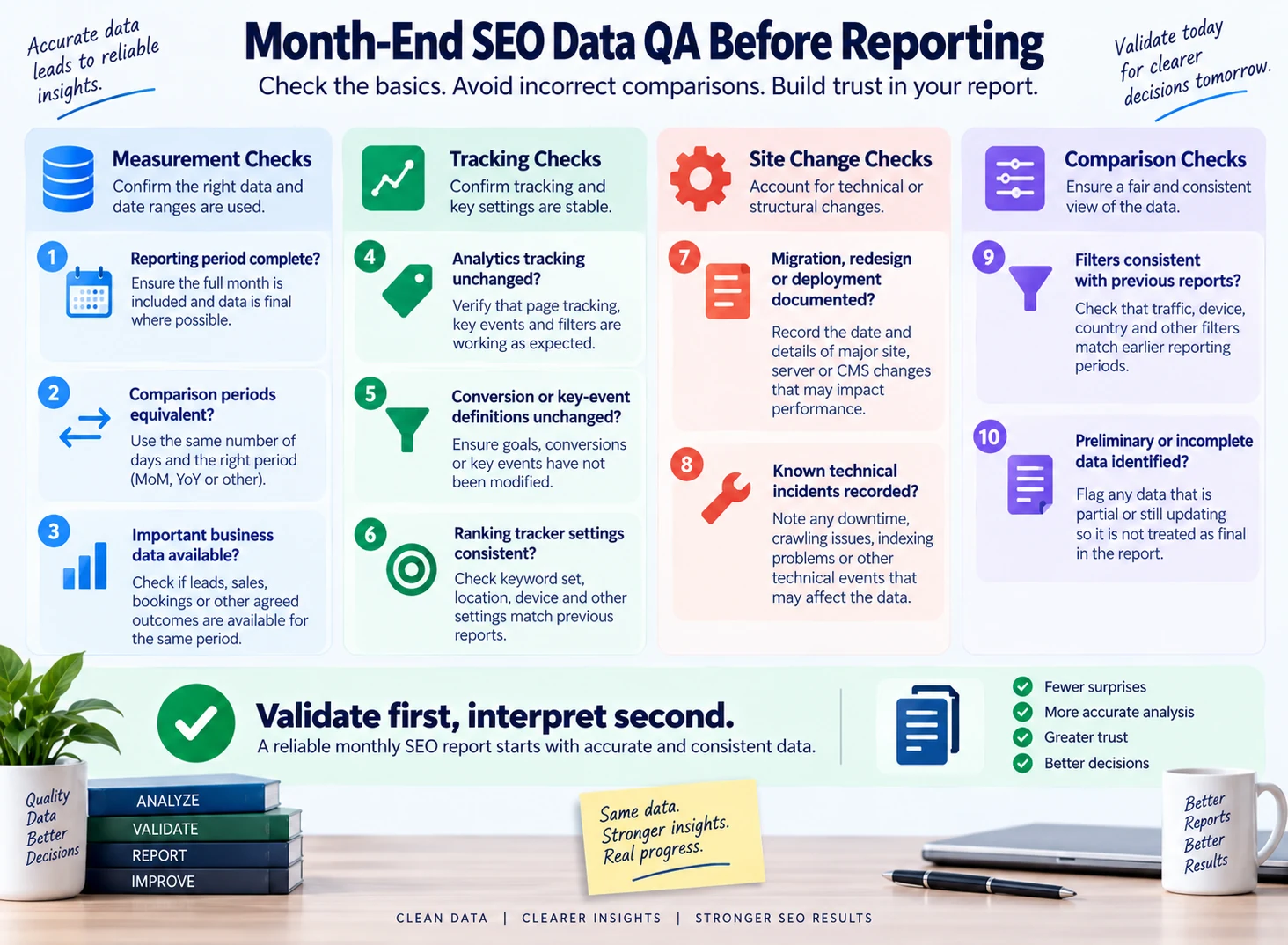
Monthly SEO analysis should begin only after the reporting period and major data sources have been checked.
This helps prevent a measurement change from being reported as an SEO performance change.
How to Read a Monthly SEO Report
A business owner or marketing manager does not need to read every chart first. Use a reading order that follows the performance story.

Read the performance story first, then investigate individual metrics and charts.
1. Start With Business Outcomes
If reliable outcomes exist, check whether organic search contributed to leads, purchases, registrations, or another important action. Then ask whether the outcome moved with traffic or independently.
2. Read the Executive Summary
The summary should identify the main performance change, risk, opportunity, and next action. If it only says "traffic increased" or "rankings improved," it probably needs more context.
3. Check Search Exposure
Review impressions and relevant visibility or ranking data. Ask whether the site appeared more or less often for important searches.
4. Check Search Response
Review clicks and CTR. If impressions increased while clicks remained flat, investigate why the additional exposure did not produce additional search traffic.
5. Review Organic Acquisition
Look at organic sessions and priority landing pages. Remember that Search Console clicks and GA4 sessions are different measurements.
GA4 distinguishes User Acquisition from Traffic Acquisition. User Acquisition is user-scoped, while Traffic Acquisition is session-scoped, so values across those reports should not be treated as interchangeable.
6. Review Work Completed
Check whether the report clearly explains what the team actually worked on. Completed activity should be specific enough to be useful.
7. Read the Limitations
Tracking changes, incomplete data, migrations, and other limitations can materially change how a result should be interpreted.
8. Finish With Next Actions
The report should answer what the team will investigate, fix, test, monitor, or prioritize next.
What Changed vs What Was Done
One of the most important monthly reporting distinctions is the difference between performance and activity.
| What changed | What was done |
|---|---|
| Organic clicks increased | Five service pages were updated |
| Impressions declined | Technical crawl issues were reviewed |
| Lead volume remained flat | Conversion copy was revised |
| Rankings improved for selected terms | Internal links were added |
| Product-page traffic declined | Product descriptions were updated |
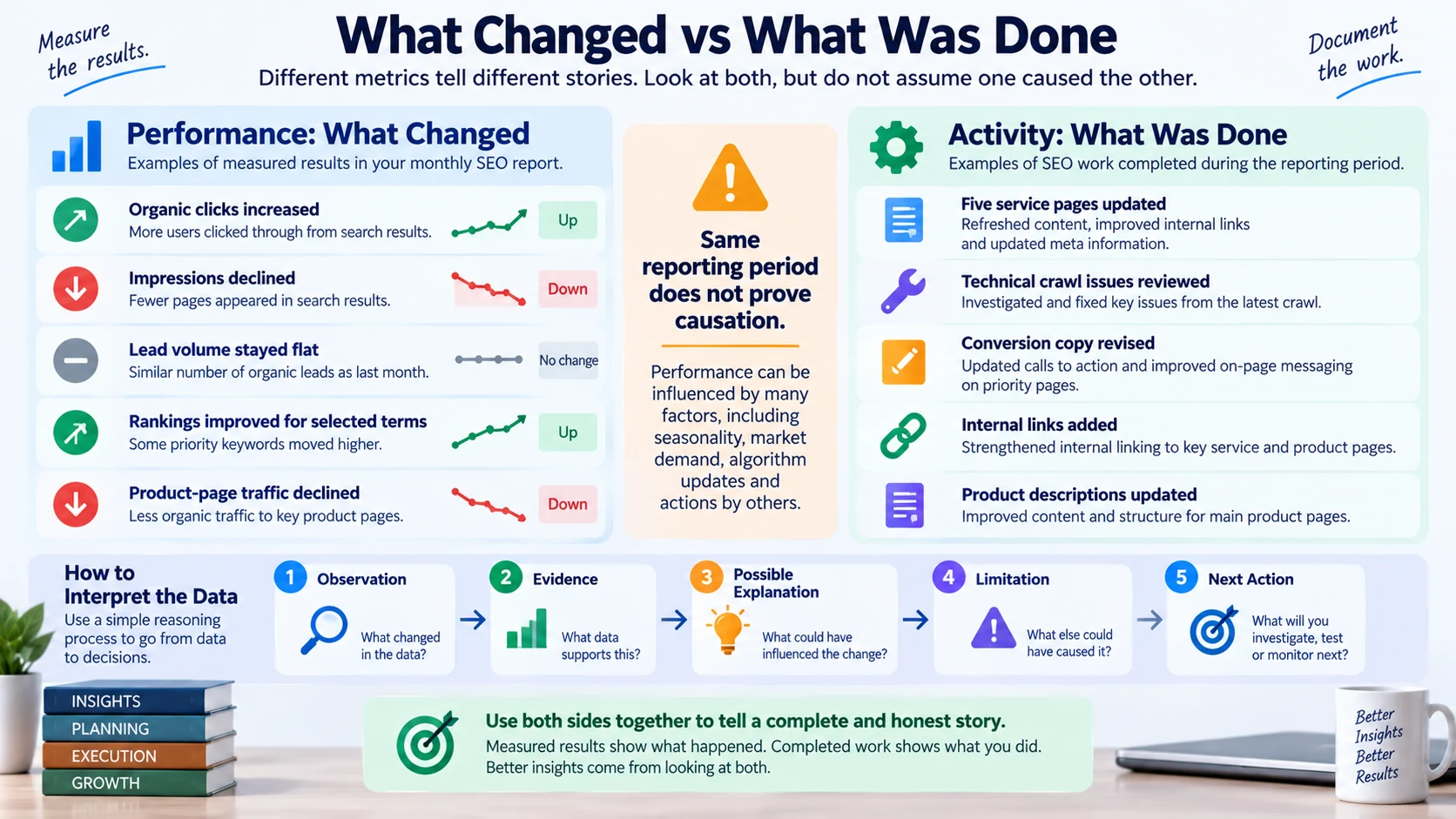
Performance changes and completed SEO work should be reported separately unless evidence supports a causal connection.
The first column describes observed performance and the second completed work. Do not automatically connect them with causal language.
Weak explanation: "Traffic increased because we optimized five pages."
Better explanation: "Organic traffic increased during the same period in which five priority pages were updated. Three of those pages contributed to the increase, but the timing alone does not establish the updates as the sole cause. The next report should check whether the gains persist and whether conversions also improve."
For additional finished-report structures and examples, see WebNextify's SEO Report Examples and Samples.
How to Explain Monthly SEO Performance
A practical commentary structure is:
Observation -> Evidence -> Possible Explanation -> Limitation -> Business Meaning -> Next Action
Observation: Organic clicks declined compared with the previous month.
Evidence: Most of the decline came from four informational pages, while priority service pages remained broadly stable.
Possible explanation: Those pages also received fewer impressions, suggesting lower search exposure contributed to the decline.
Limitation: The data alone does not establish whether the exposure change came from rankings, search demand, SERP changes, or a combination of factors.
Business meaning: The loss was concentrated outside the main commercial page group, so the immediate effect on lead-generating pages appears limited.
Next action: Review the affected queries and pages, compare year-over-year demand, and determine whether content, ranking, or seasonal factors deserve action.
This is more useful than labeling every decline as a problem or every increase as a success.
Monthly SEO Report PDF, Dashboard, or Live Report?
Different formats serve different purposes.
A monthly SEO report PDF creates a fixed record that stakeholders can archive or share internally.
Do not call something a downloadable PDF template unless an actual downloadable file exists.
Dashboard
A dashboard supports ongoing monitoring between reporting dates, but it may lack the commentary needed for decisions.
Email Summary
An email can work for a small account or executive audience when the key story can be explained concisely. It may link to a more detailed report or dashboard.
Shared Document or Spreadsheet
A shared document supports comments, editable notes, and collaborative review.
Reporting Platform
A dedicated reporting platform can automate recurring data collection, visualization, and delivery. The platform still needs a review process.
There is no universal best monthly SEO report format. The right format depends on the audience, complexity, collaboration needs, and reporting process.
How Much Should Monthly SEO Reporting Be Automated?
Automation is most useful for repetitive mechanics.
Good candidates include data collection, recurring charts, standard calculations, scheduled exports, report duplication, delivery reminders, and historical storage.
Human review should remain responsible for data anomalies, business context, interpretation, possible causes, limitations, priority setting, and final approval.
A monthly SEO report generator should therefore be evaluated on more than how quickly it creates a PDF. You can use WebNextify's free tool to generate a practical baseline report, then add the human interpretation, business context, and priorities that recurring reporting requires.
Useful questions include:
- Can the required data sources connect?
- Can date comparisons be customized?
- Can the report be reviewed before delivery?
- Can scheduled delivery be paused?
- Can commentary be added?
- Can permissions be controlled?
- Can internal and client-facing versions differ?
- Can historical reports be accessed?
- Can unresolved priorities be carried forward?
Automation should reduce repetitive work without removing judgment from the reporting process.
What Should an SEO Monthly Report for a Client Include?
A client-facing report should prioritize clarity. The client usually needs the goal and reporting period, the main result, business-relevant metrics, priority page or search changes, important work completed, major limitations or risks, and next actions.
The client report does not need every diagnostic chart used internally by an SEO team. An analyst may need detailed query groups, crawling data, ranking distributions, tracking notes, and page-level investigations. A client may need the conclusion supported by a smaller amount of evidence.
The level of detail should match the decisions the reader needs to make.
Carry-Forward Issues and Priorities
A monthly report should not forget an issue simply because the calendar changed. Keep a carry-forward tracker for unresolved work.
| Field | Purpose |
|---|---|
| Issue or opportunity | What needs attention |
| First identified | When it entered the reporting process |
| Current status | Open, in progress, blocked, completed |
| Evidence | Why it still matters |
| Owner | Who is responsible |
| Next action | What should happen |
| Review date | When it should be checked again |
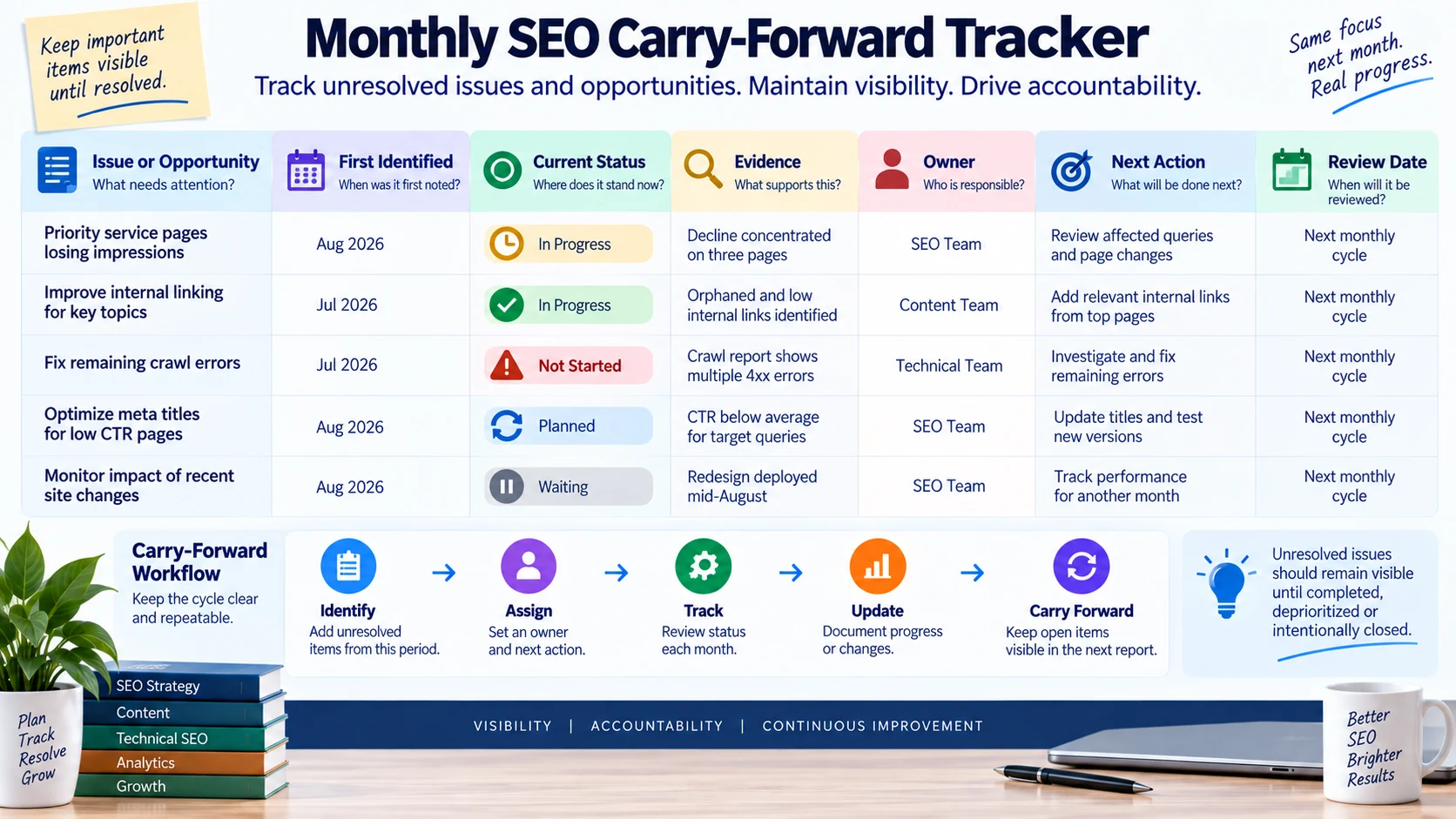
Carry-forward tracking keeps important SEO issues visible across monthly reporting periods.
If a technical issue was discovered in June but requires development work in August, the July report should not silently drop it.
Common Monthly SEO Reporting Mistakes
- Reporting before the period is complete can create unstable comparisons.
- Using only month-over-month data for a strongly seasonal business can hide useful context.
- Showing rankings without impressions, clicks, or page relevance can overstate movement.
- Mixing completed work with performance results can imply unsupported causation.
- Sending an automated report without reviewing anomalies can distribute misleading commentary.
- Changing filters, tracking definitions, keyword sets, or conversion setups without disclosing the change can weaken comparisons.
- Including every available metric makes the report longer without necessarily making it more useful.
- Dropping unresolved issues at the end of each reporting cycle breaks continuity.
- A report that does not identify next-month priorities remains a historical record rather than a decision tool.
Monthly SEO Report QA Checklist
Before delivery, confirm:
1. The reporting period is correct.
2. The comparison period is appropriate.
3. Data sources are clearly identified.
4. Important tracking changes are disclosed.
5. Search Console and GA4 metrics are not treated as interchangeable.
6. Important pages and search themes are represented.
7. Business outcomes are included where reliable measurement exists.
8. Completed work is separated from observed performance.
9. Possible explanations are not written as proven causes.
10. Unresolved issues are carried forward.
11. Next actions are specific.
12. The report has received human review.
Consistent QA is especially important when report production is partly automated.
How WebNextify Can Help
WebNextify's SEO Services currently include technical SEO audits, keyword and competitor research, on-page optimization, content planning and optimization, internal linking and site structure, and Search Console and progress reporting.
For businesses building a recurring reporting process, the useful starting point is a clear baseline, reliable measurement, and an agreed set of priorities. Reporting should then show what changed, what requires investigation, and how the next SEO priorities should be refined rather than promising a fixed ranking or result.
Frequently Asked Questions
What should be included in a monthly SEO report?
How often should SEO reports be sent?
What is the best monthly SEO report format?
Should a monthly SEO report include rankings?
What is the difference between a dashboard and a monthly SEO report?
Should monthly SEO reports use month-over-month or year-over-year comparisons?
Can monthly SEO reports be automated?
How do you read a monthly SEO report?
Conclusion
A monthly SEO report should be more than a recurring collection of metrics. Its value comes from a repeatable process that closes the reporting period correctly, validates data, chooses fair comparisons, explains meaningful changes, separates completed work from observed outcomes, records limitations, and turns findings into next-month priorities. When the same workflow is followed consistently, monthly SEO reporting becomes a practical operating system for SEO decisions rather than another document that gets sent and forgotten.